Plan single-day and multi-day surveys
Create field plans with start and end times, private notes, tentative schedules, and the resources needed for the work.
- Start and end time planning
- Multi-day work support
- Private and tentative plan states

Scheduling and dispatch
PLN connects the schedule to the actual survey task, so managers can plan fieldwork with the crew, equipment, vehicle, date, time, and context in one place.
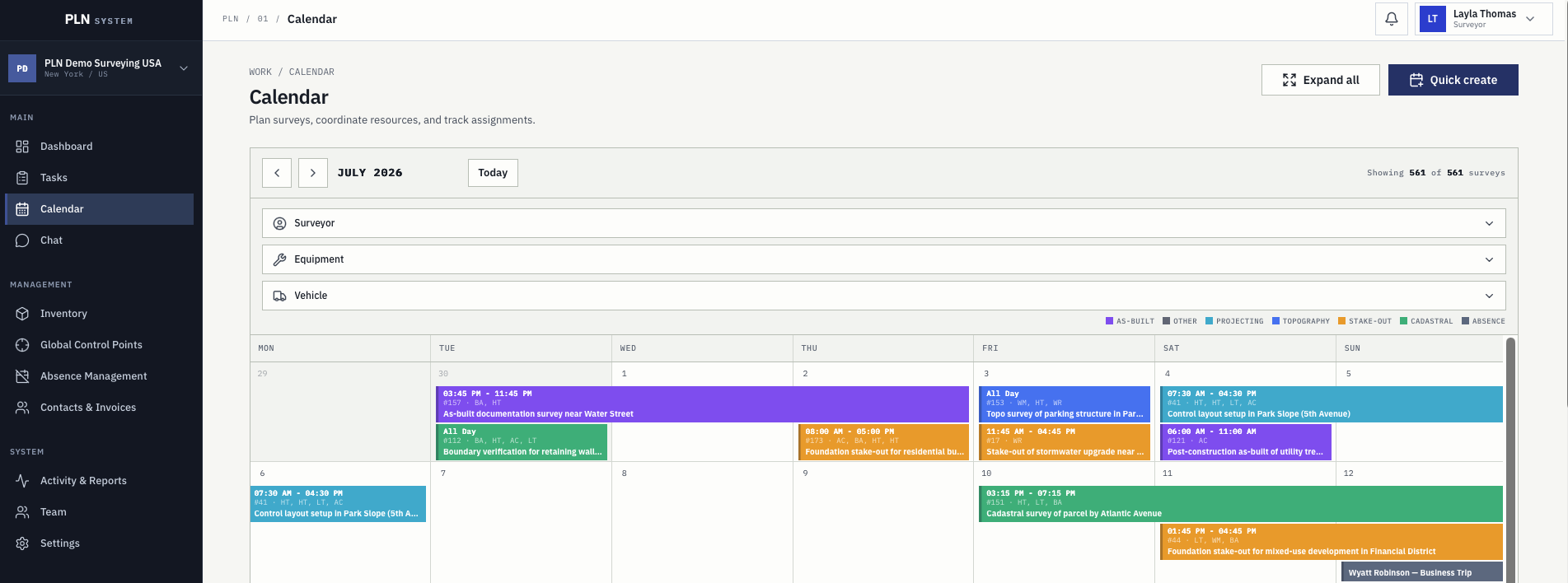
Create field plans with start and end times, private notes, tentative schedules, and the resources needed for the work.
Surveyors, equipment, vehicles, materials, and absences are visible where planning happens, reducing late conflicts.
Calendar entries link back to task details, so the schedule is not separated from the client, location, scope, comments, and history.
Questions
Yes. Absences are requested and approved in PLN and are part of planning context, so a crew is not planned around someone who is away.
They are visible in the same planning view. Calibration, check-and-adjust, insurance, and inspection dates are held on the equipment record and are known before a crew leaves.
Yes. Single-day and multi-day survey work can both be planned, with surveyors and resources assigned to the plan rather than to a single date.
Assigned work and the schedule are both in the mobile app, alongside task detail, geometry, and control points. The app is available on Google Play and the App Store.
Next step
Start a three-month free trial or contact the team with questions about rollout, pricing, trust, and workflow fit.