Activity and reporting

Field Reporting Software for Surveyors

A survey field report is only worth the time it saves. PLN records the work against the task it belongs to, so the crew fills in what they know and the office reads it in context instead of reassembling it from a chat thread.

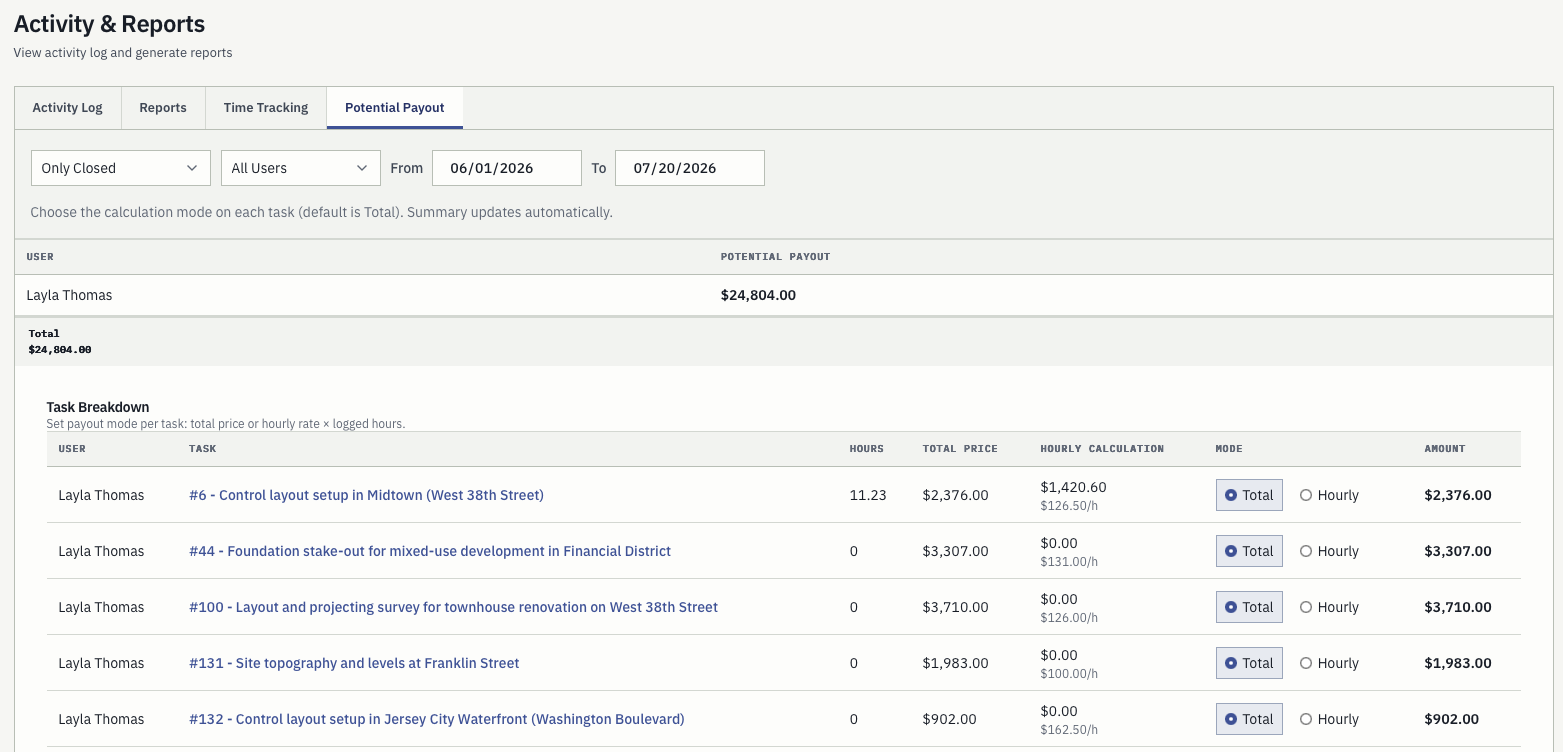
Survey activity report with per-task hours, total price, hourly calculation, and potential payout
A field report nobody has to retype is worth more than a field report with more fields. Hours, distance, expenses, and notes arrive attached to the task they belong to, so a monthly summary is a filter rather than a reconstruction.

Recorded against the task, not beside it

An activity entry carries the work date, the user, the task, time spent, distance, expenses, and notes. Because the task is part of the record rather than a label typed into a cell, every later view of that work already knows the client, the location, and the price.

  • Work date, user, and task
  • Time spent, distance, expenses
  • Notes with enough detail to review

Filtered, not reassembled

Reports filter by date range, user, task, or status. Preparing a monthly summary or checking a payout is a filter over records that already exist, which is a different job from chasing six people for their week.

  • Date range, user, task, status
  • Monthly summaries without collection
  • Gaps visible against planned work

The same record bills the job

Because activity stays connected to the task, invoice preparation starts from captured facts rather than reconstructed memory. Nothing is retyped between the report and the invoice, so nothing drifts between them.

  • Task-linked pricing and history
  • Invoice-ready without re-entry
  • One version of what happened

On this page

What survey field reporting actually has to do.

Field reporting software is a crowded category, and most of it is built for inspection rounds or construction checklists. This page is about the survey case specifically: what a report has to carry, how it gets filled in on site, what the office does with it, and where it differs from a generic field form.

The record

Five things a survey field report has to carry.

Generic field reporting tools model an inspection: a form, a checklist, a signature. Survey work is not an inspection. It is a job with a location, a price, a crew, instruments, and a client waiting for a deliverable, and a report that drops any of those creates office work rather than removing it.

01

Which task, not which site

The unit of survey work is the task: a client, a survey type, a location, a due date, and a price. A report filed against a site or a date has to be matched back to the job by a human. A report filed against the task never needs matching.

02

Time, in a form payroll can use

Time spent is recorded per activity entry, against the user who did the work. That makes the same number usable for a payout check, a profitability question, and an invoice line, instead of being re-derived three times from three places.

03

Distance, because survey work drives

Survey crews travel between marks, and the driving is a real cost that generic field forms rarely capture. Distance sits alongside hours in the same entry, so a monthly total includes the travel that actually happened.

04

Expenses, at the moment they occur

Parking, materials, fuel, an unexpected permit. Recorded on the job they belong to, they reach the invoice. Recorded on a receipt in a jacket pocket, they reach the invoice sometimes.

05

Notes a manager can act on

The free-text note is where a surveyor says the mark was disturbed, the access road was closed, or the client changed the boundary on site. It is the part no form field anticipates and the part the next crew most needs.

On site

Filing it from the phone, one-handed, on a verge.

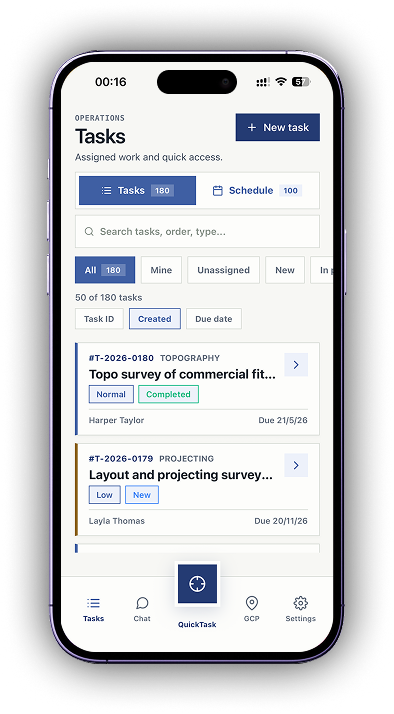
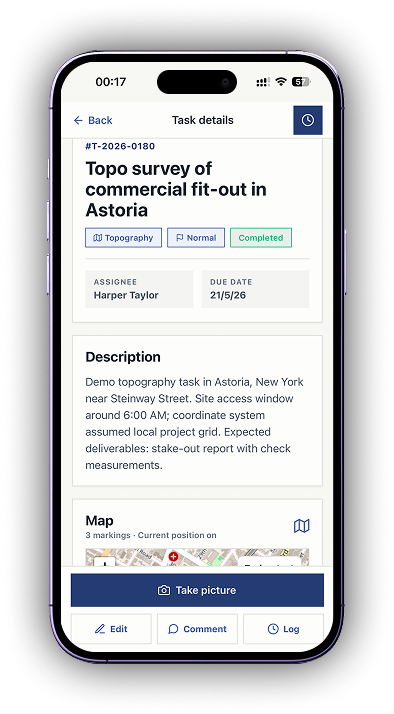
The field app is built for the crew standing on site rather than for reporting from a desk. Assigned work, task geometry, control points, photos, and chat are in the pocket, and the office sees the result immediately. The app is available on Google Play and the App Store.

Filed where the work happened

The crew opens the task they are standing on and adds the entry there. Choosing the job from a list at the end of the day is where mis-filed reports come from, and it is the step this removes.

No signal is not a blocker

Work submitted without a connection is queued on the device and sent automatically when the connection returns. Settings shows when the last sync happened and whether anything is still waiting, so a crew can see the queue has cleared before leaving a valley.

The office sees it immediately

There is no end-of-day upload step and no export. Once an entry syncs it is in the same activity log the office reads, which is what makes a same-day question answerable the same day.

In the office

What the report becomes once it lands.

A field report that is only ever read once has not earned the time it cost to file. These are the two things the same record does afterwards without anyone re-entering it.

Activity and reports screen with the potential payout tab, per-task hours, total price, hourly rate, and calculation mode

Activity and reports

Totals calculated from work already recorded.

The activity log, time tracking, and potential payout are computed from the entries the crews filed. Choose a total price or an hourly rate per task and the summary updates itself, so a payout conversation starts from the same numbers the surveyor entered.

  • Filter by date range, user, task, or status
  • Per-task hours, total price, and hourly calculation
  • Compare against planned work to find missing logs
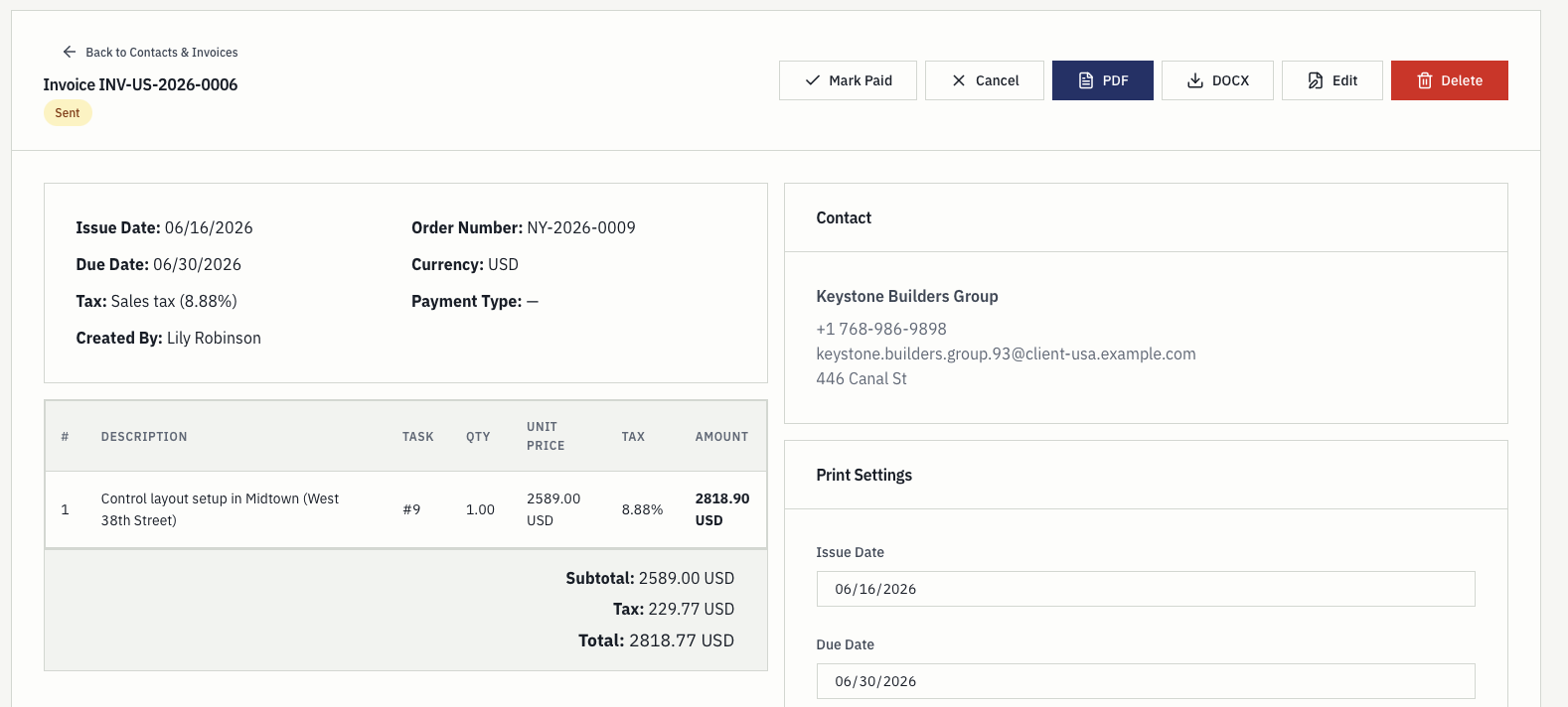
Survey invoice details with contact record, line items, totals, and payment status

Billing

The invoice starts from the captured facts.

Task pricing, the contact record, activity history, and billing actions are visible where the work was managed. The invoice is prepared from what was recorded rather than from someone's reconstruction of the month, which is the difference between checking an invoice and rebuilding one.

  • Task price and contact already attached
  • Activity history behind every line
  • Draft, sent, and paid statuses on the register

The month-end problem

Most survey reporting cost is paid at the end of the month.

Very few survey companies fail to record their work. What they lack is a place where the record is already in the shape the next question needs, so the cost lands weeks later, in the office, on the person preparing the invoices.

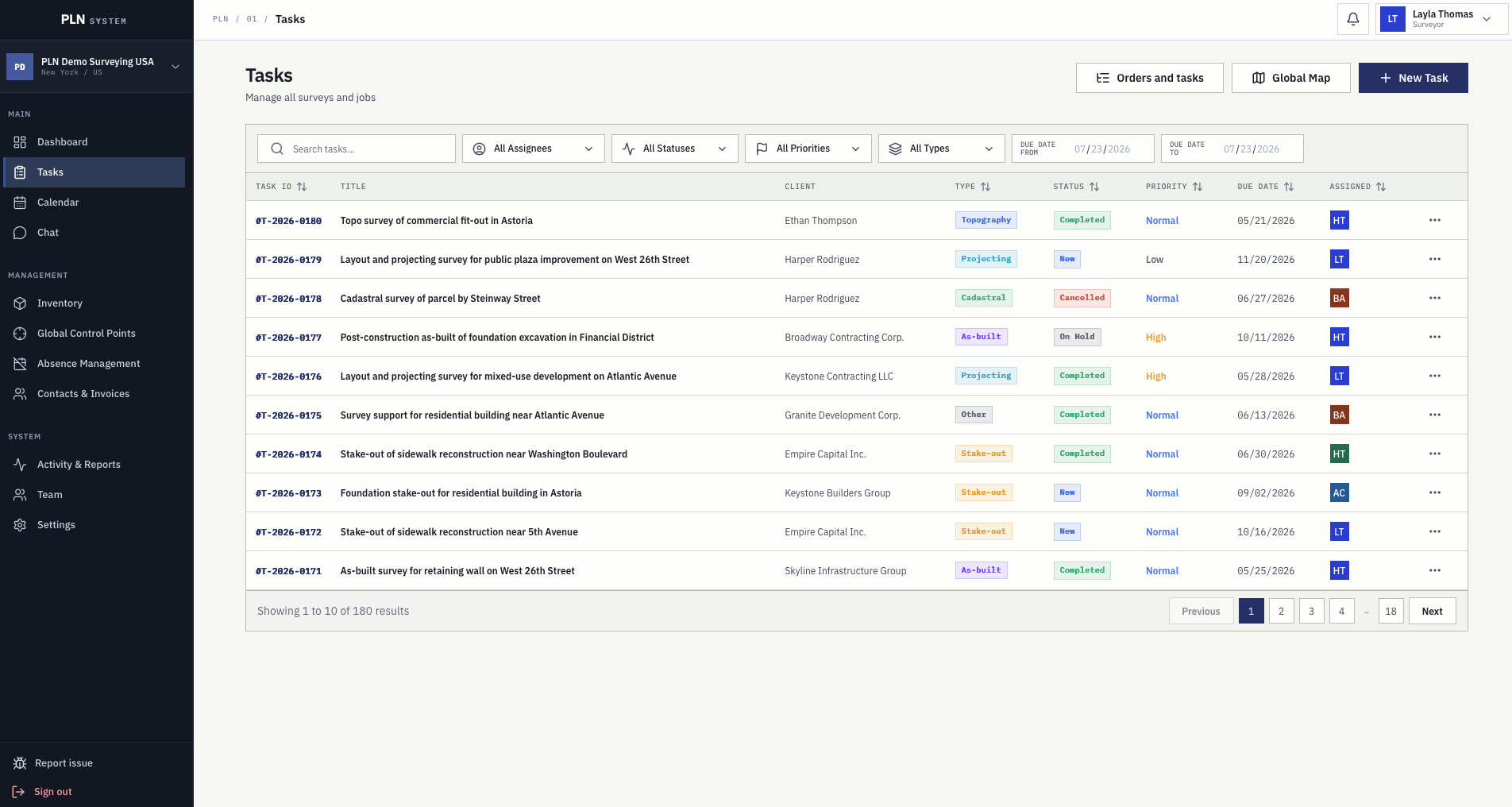
PLN task register with survey type, client, status, priority, due date, and price for each job
The task register every activity entry is filed against.

Collection is the expensive step, not recording

When hours live in a messaging thread, distances in a notebook, and expenses on receipts, nothing is missing — it is just distributed. The work is gathering it, and that work scales with the number of crews rather than the number of jobs.

Reconstruction introduces disagreement

A month rebuilt from memory produces numbers that a surveyor can dispute, because they were derived rather than recorded. A month filtered from entries the surveyor filed themselves produces numbers nobody has to defend.

What gets dropped is what was never attached

The expense that never made it to an invoice, the extra hour nobody logged, the second trip because the mark had moved. These are not accounting errors; they are the predictable result of recording work somewhere the invoice does not read.

Missing logs should be visible while they still matter

Comparing activity against planned work shows the gaps during the month rather than at the end of it, when the crew still remembers the day well enough to fill one in.

Category fit

Survey reporting against generic field reporting.

Most field reporting software is built for inspection rounds, utility maintenance, or construction sign-off. Those tools are good at what they do. The mismatch is structural rather than a question of quality, and it shows up in the same five places every time.

Generic field reporting PLN
Unit of work A form, a site visit, or a checklist run A survey task with client, type, location, and price
Travel Rarely modelled; logged as an expense if at all Distance recorded in the same entry as hours
Instruments Not modelled, or a free-text field Inventory with calibration dates used during planning
What happens next Report is stored, exported, or emailed Totals, payout checks, and the invoice read the same record
Who it was built for Inspectors, technicians, contractors Survey companies, by a working land surveyor

Who files what

Four people touch the same record.

Field reporting fails when it is one person's chore. It works when each role puts in what only they know and takes out what only they need.

01

Field surveyor

Files the entry on the task while standing on it: hours, distance, expenses, and the note about what was actually found. This is the only step that has to happen on site, and it is the only step the app is optimised for.

02

Crew lead

Checks that the day's assigned work has entries against it before the crew stands down, using the same task list the surveyors filed against. Missing logs are visible against planned work rather than discovered a month later.

03

Office manager

Reads activity by date range, user, or status to answer where the month went, which tasks ran long, and what needs following up. No collection step, because there was never anything to collect.

04

Billing

Prepares invoices from tasks whose price, contact, and activity history are already attached, and can see the work behind each line without asking who did it.

Questions

Common buying questions.

What does a field report in PLN actually contain?

An activity entry records the work date, the user, the task it belongs to, time spent, distance travelled, expenses, and a free-text note. Because the task is part of the record, the client, survey type, location, and price come with it rather than being retyped.

Does it work without a mobile signal?

Yes. Work submitted without a connection is queued on the device and sent automatically when the connection returns. Settings shows when the last sync happened and whether anything is still waiting.

How much training does a field crew need?

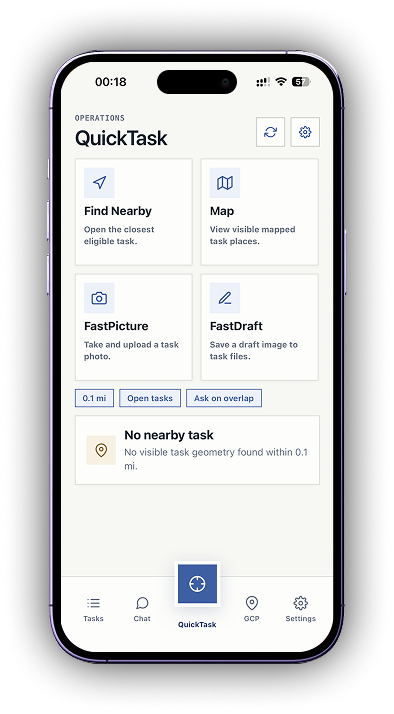
The field flow is opening the assigned task and adding an entry to it. QuickTask exists for one-handed work on site, with find nearby, FastPicture, and FastDraft. Crews who already send updates by message are not learning a new habit, only a different place to put it.

How does a field report reach an invoice?

It does not have to travel. Activity is recorded against the task, and the task carries the price, the contact, and the history, so invoice preparation reads the same record rather than importing from it.

Does this replace a timesheet?

For survey work it usually does, because time spent is recorded per entry against the user and the task. That makes the same figure usable for payout checks and for asking whether a task type is priced correctly.

Is the mobile app available now?

PLN System Mobile is available now on Google Play and the App Store.

Next step

See how PLN fits your survey workflow.

Start a three-month free trial or contact the team with questions about rollout, pricing, trust, and workflow fit.