Comparison

PLN System vs Spreadsheets

Spreadsheets can track lists, but survey operations need connected records. PLN gives each job a place where planning, resources, activity, and billing stay together.

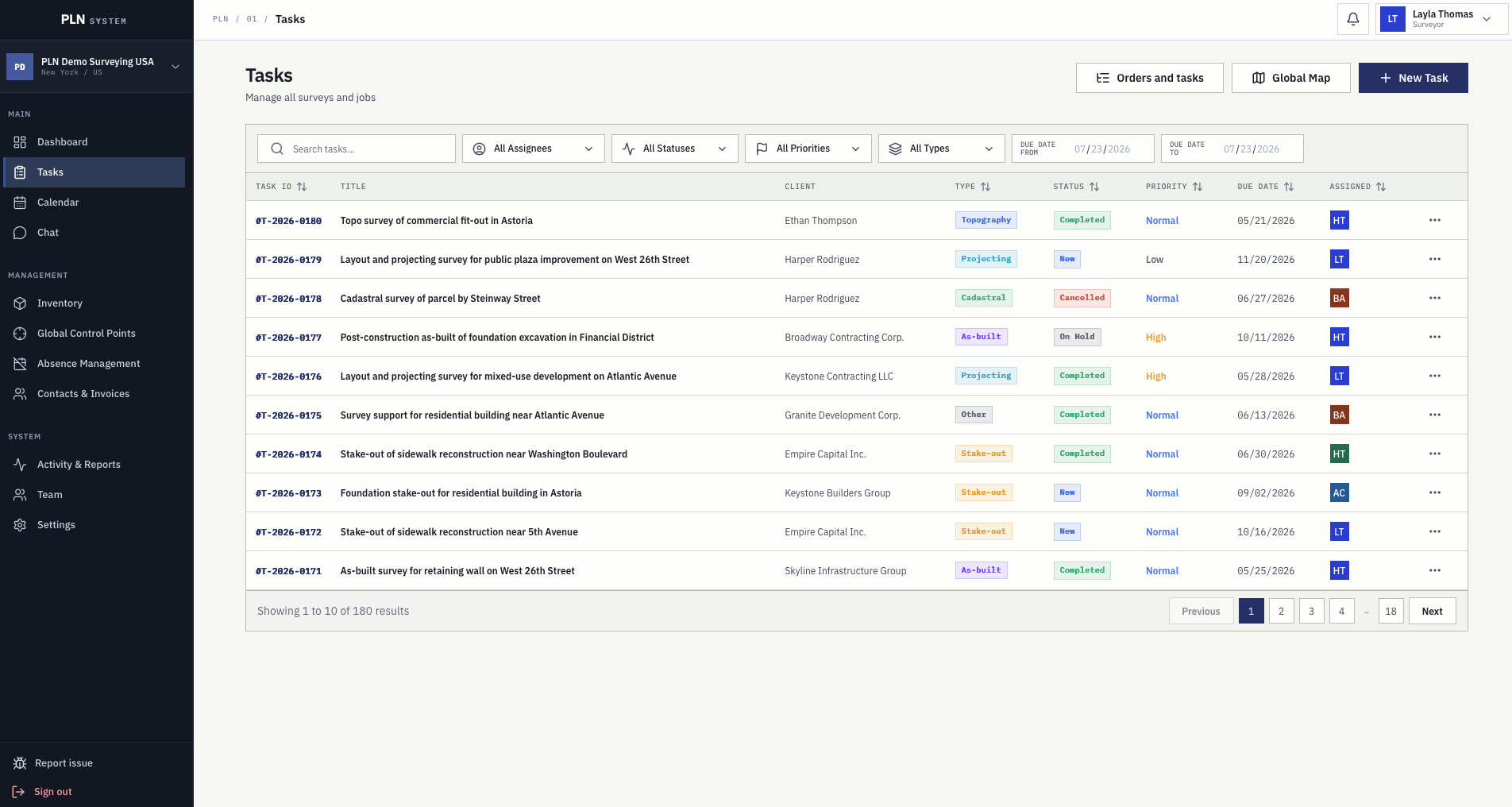
PLN System task register replacing fragmented survey operations spreadsheets
Spreadsheets are not the problem. The gaps between them are. Every survey company that outgrows spreadsheets outgrows them the same way: not because a file broke, but because six files stopped agreeing and nobody could tell which one was right.

Why spreadsheets break down

When task lists, crew plans, equipment notes, activity logs, and invoice details live in separate files, managers lose the current picture.

  • Duplicate data entry
  • No reliable task history
  • Weak permission and accountability controls

What PLN keeps connected

PLN links the operational details that survey teams need from request through invoice.

  • Tasks and locations
  • Crews, equipment, vehicles, and absences
  • Activity, reports, contacts, and invoices

When the switch makes sense

PLN is most useful when a survey company has multiple active jobs, several team members, recurring scheduling conflicts, or billing delays caused by missing context.

  • Growing survey workload
  • More than one coordinator
  • Need for clearer job history
Need Spreadsheet workflow PLN System workflow
Task history Often spread across files, chats, and personal notes. Kept on the task with comments, files, plans, activity, and invoice actions.
Scheduling Manual calendar updates and weak resource conflict visibility. Survey planning tied to crews, equipment, vehicles, and absences.
Billing Job details are copied into separate invoice files. Invoice records use task pricing, contacts, activity, taxes, and payment status.
Field reporting Arrives as messages and photos, then gets typed in by whoever is free. Filed against the task from the phone, queued offline and synced when signal returns.
Equipment Calibration dates in a second file nobody opens before dispatch. Calibration, insurance, and inspection dates used during planning.
Control points Coordinates in one surveyor's notebook or a folder of exports. An organisation-wide register with condition notes and photographs.
Who can answer a question Whoever owns the file, when they are at their desk. Anyone with access, from the record itself.
Cost of a mistake Silent: a stale copy stays plausible until someone acts on it. Visible: there is one record, so a wrong value is wrong in one place.

How it happens

Nobody chooses six spreadsheets. They accumulate.

The spreadsheet stage is a rational response to a real need, and it works for longer than most software vendors admit. It stops working in a specific, predictable order.

01

One file, and it works

A job list with client, type, due date, and status. For a two-person company this is genuinely the right tool, and replacing it early costs more than it saves.

02

A second file, because the first got crowded

Scheduling moves to its own sheet, or a shared calendar. The job list and the schedule now have to agree, and they agree because one person keeps them in step.

03

A third and fourth, for equipment and hours

Calibration dates and time logs each get a file. Neither is consulted at the moment it matters, because the moment it matters is during planning and the file is somewhere else.

04

The chat thread becomes the real system

Field updates arrive as messages and photos, because that is the fastest thing for the crew. The messages are the record; the spreadsheets are a summary of it, updated when someone has time.

05

Month end takes a week

Invoicing now means reconciling four files and a chat history against memory. This is the point at which the spreadsheets are not slow — they are wrong, and nobody can prove which parts.

Who pays

The cost lands on four different people.

Spreadsheet coordination rarely shows up as a line in a budget. It shows up as specific people doing specific work that would not exist if the records agreed.

01

The owner

Cannot answer how profitable a task type is without an afternoon of reconciliation, so the question stops being asked and pricing stops being reviewed.

02

The project manager

Spends the first hour of each day rebuilding the current picture from messages, and the last hour writing it back into files.

03

The field surveyor

Reports the same job twice — once to whoever asked in the chat, once again in whatever form the office wants — and is blamed for the gaps in the second one.

04

Whoever does the invoicing

Carries the whole accumulated mismatch at month end, and is the person who discovers the expense nobody logged and the second trip nobody recorded.

An honest limit

When a spreadsheet is still the right answer.

This page argues for a connected record, not against a tool that has served survey companies well for thirty years. There are cases where moving is the wrong call.

PLN task register with survey type, client, status, priority, due date, and price for each job
The register a spreadsheet becomes once the records have to agree.

One or two people, one file

If a single person holds the whole picture and the file is never out of step with reality, coordination software solves a problem you do not have.

A calculation, not a record

Adjustments, area computations, and one-off analysis belong in a spreadsheet. PLN does not replace that and does not try to.

Something you already trust and maintain

A working system with one owner beats a better system nobody keeps current. The trigger for moving is not sophistication, it is the day the files stop agreeing.

Questions

Common buying questions.

Can existing spreadsheets be imported?

During onboarding the team helps map a current job list, statuses, team roles, and workflow into a PLN setup plan. That is a guided setup rather than an automated import, and it is described honestly as such.

Do spreadsheets have to be abandoned entirely?

No. Calculations, adjustments, and one-off analysis are what spreadsheets are good at. What moves is the shared operational record that several people have to keep in step.

How small is too small for this?

If one person holds the whole picture and the files never fall out of step, a spreadsheet is still the right tool. The trigger is usually a second crew, or the first month end that takes a week.

What actually changes on day one?

There is one task record instead of several files describing the same job, and field updates land on it directly rather than being relayed. Most of the saving is at month end rather than in daily work.

Next step

See how PLN fits your survey workflow.

Start a three-month free trial or contact the team with questions about rollout, pricing, trust, and workflow fit.