Land surveyor workflow

Project Management Software for Land Surveyors

Land survey teams need more than generic tasks. PLN keeps the work practical for owners, project managers, field surveyors, and billing staff who need one current view of each job.

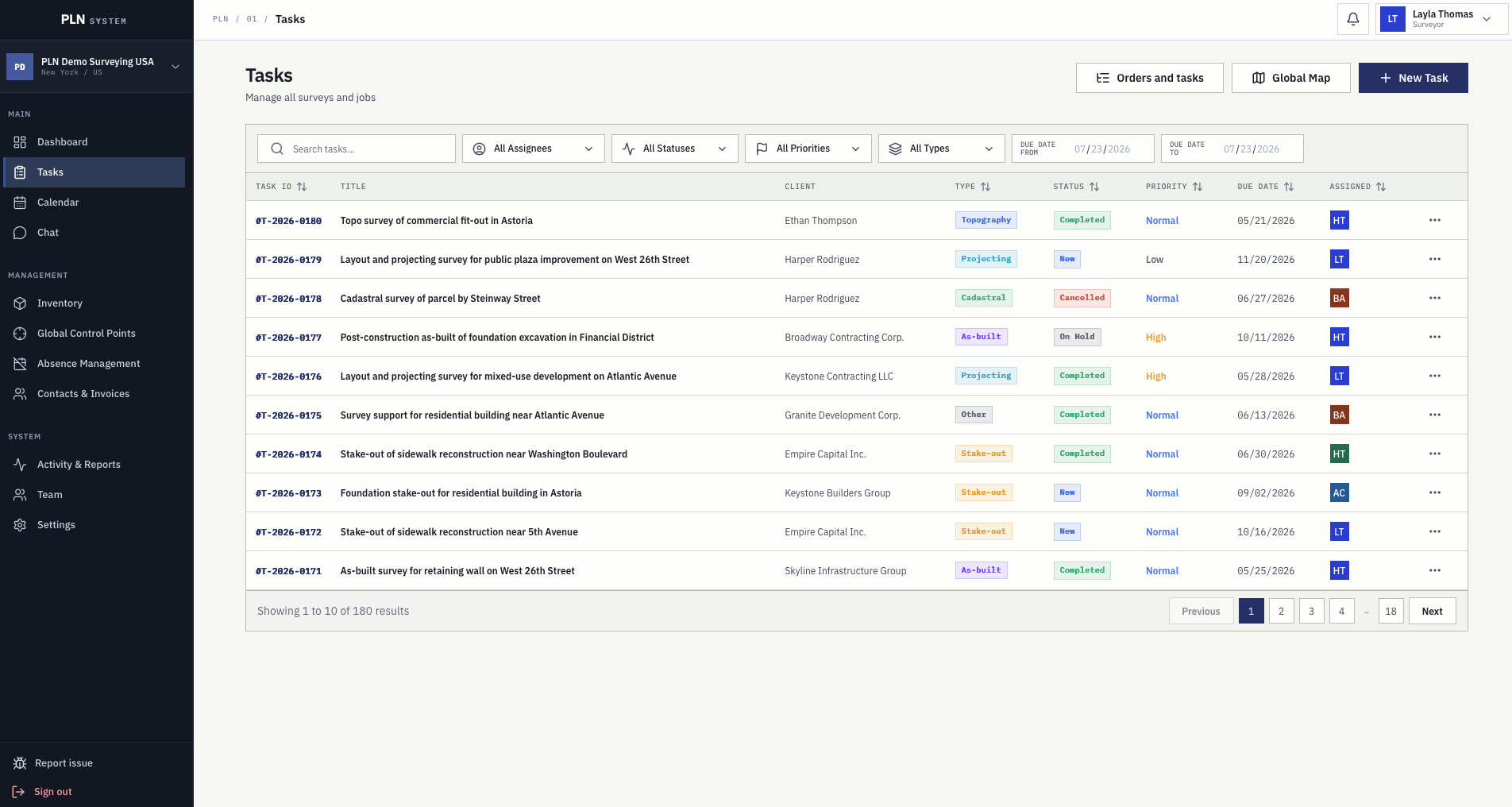
Survey task register with assignee, status, priority, type, due date, and client columns
Built for how a land surveying company actually runs a job. Parcel and location context, crews, instruments, vehicles, time off, field records, and billing sit on the same job file, in the office and on site.

One place for scope and responsibility

The task record captures what needs to be done, who owns it, where it happens, and what information the field team needs before arrival.

  • Client and location details
  • Survey type and priority
  • Assigned users and due dates

Coordination for owners and managers

PLN gives management a view into active work, schedule load, resource availability, pending invoices, and the activity behind each job.

  • Calendar and workload visibility
  • Resource checks before dispatch
  • Pending invoice and payment status

Clearer handoff to billing

Pricing, activity, tax, payment details, due dates, and export actions live with the task so billing does not need to rebuild job context manually.

  • Task pricing history
  • Invoice statuses
  • PDF and DOCX exports

On this page

The whole picture, from intake to invoice.

This page walks through how a land surveying company runs on PLN: the daily workflow, the job record, control points and field use, the mobile app, people and scheduling, billing, and what to check before choosing any system.

A surveyor's workflow

Five steps that already describe your week.

Land surveying companies rarely need a new methodology. They need the steps they already follow to stop living in five different places, so nothing is retyped and nothing is remembered wrong.

01

Take the request

A client call or email becomes a task with the contact, address or coordinates, survey type, priority, price, due date, and the files the crew will need.

02

Check who and what is free

Before a date is promised, the calendar shows assigned surveyors, booked instruments and vehicles, and approved time off in the same view.

03

Plan the field visit

Single-day and multi-day plans carry start and end times, private notes, and a tentative state while the date is still being agreed with the client.

04

Work the job on site

Crews open the task on the phone with its map geometry, control points, files, and contact, then log time, photos, and comments where the work happens.

05

Close it and bill it

Recorded activity, pricing, and contact details feed the invoice, which exports to PDF or DOCX and keeps its payment status on the job.

The job record

Everything about one survey lives in one file.

A land survey job is not a generic to-do. It carries a client, a parcel, a survey type, a price, files, a crew, a plan, a record of what changed, and eventually an invoice. PLN keeps all of that on the same record instead of spread across a folder, a chat, and someone's memory.

Survey task register with search and filters for assignee, status, priority, survey type, and due date
The task register, filtered by assignee, status, priority, survey type, and due date range.

Structured intake

Client and contact, survey type, address or coordinates, description, priority, price, due date, and attachments are captured when the job is created.

Clear ownership

Every task has an assignee and a status, so nobody has to ask who is holding a job or whether it has already moved on.

History that stays put

Comments, uploaded files, status changes, plans, and billing actions remain on the record instead of scattering into inboxes and private chats.

Filters for a real workload

Find work by assignee, status, priority, survey type, or due date range once the register grows past what one person can hold in their head.

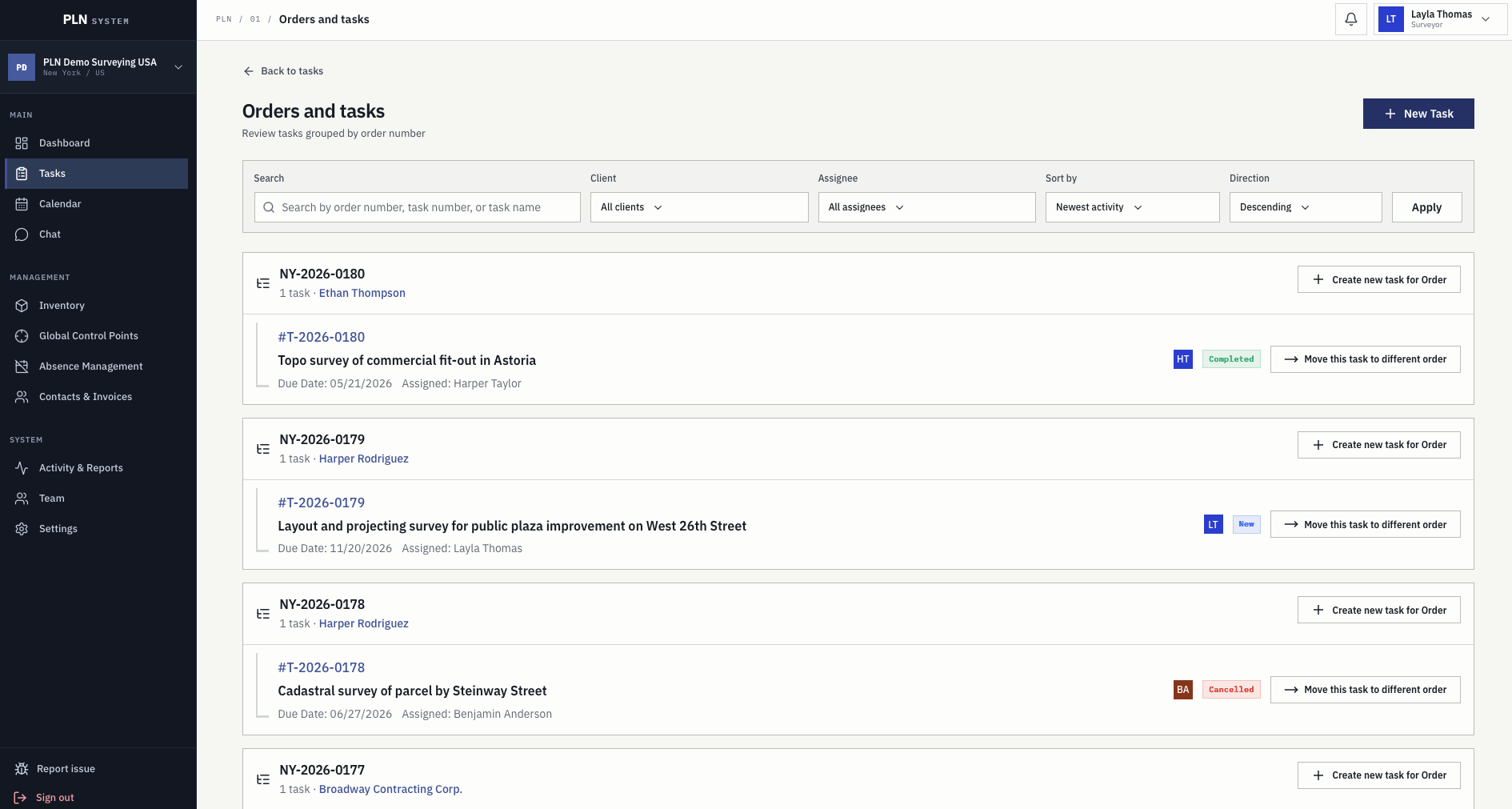
Orders and tasks screen grouping survey tasks under their order number with client and assignee

Orders and lineage

One client order, several survey tasks.

A single order often turns into topographic work, staking, and a final measurement. PLN groups those tasks under the order they came from, so the office can see what was ordered, what is running, and what still has to be created.

  • Tasks grouped under their originating order number
  • Create a new task directly for an existing order
  • Move a task to a different order when the scope changes

Control points and location

The location knowledge stops leaving with the person who has it.

Most surveying companies lose more time to finding marks and re-establishing points than to any office process. PLN stores that knowledge for the whole organization instead of in one surveyor's notebook.

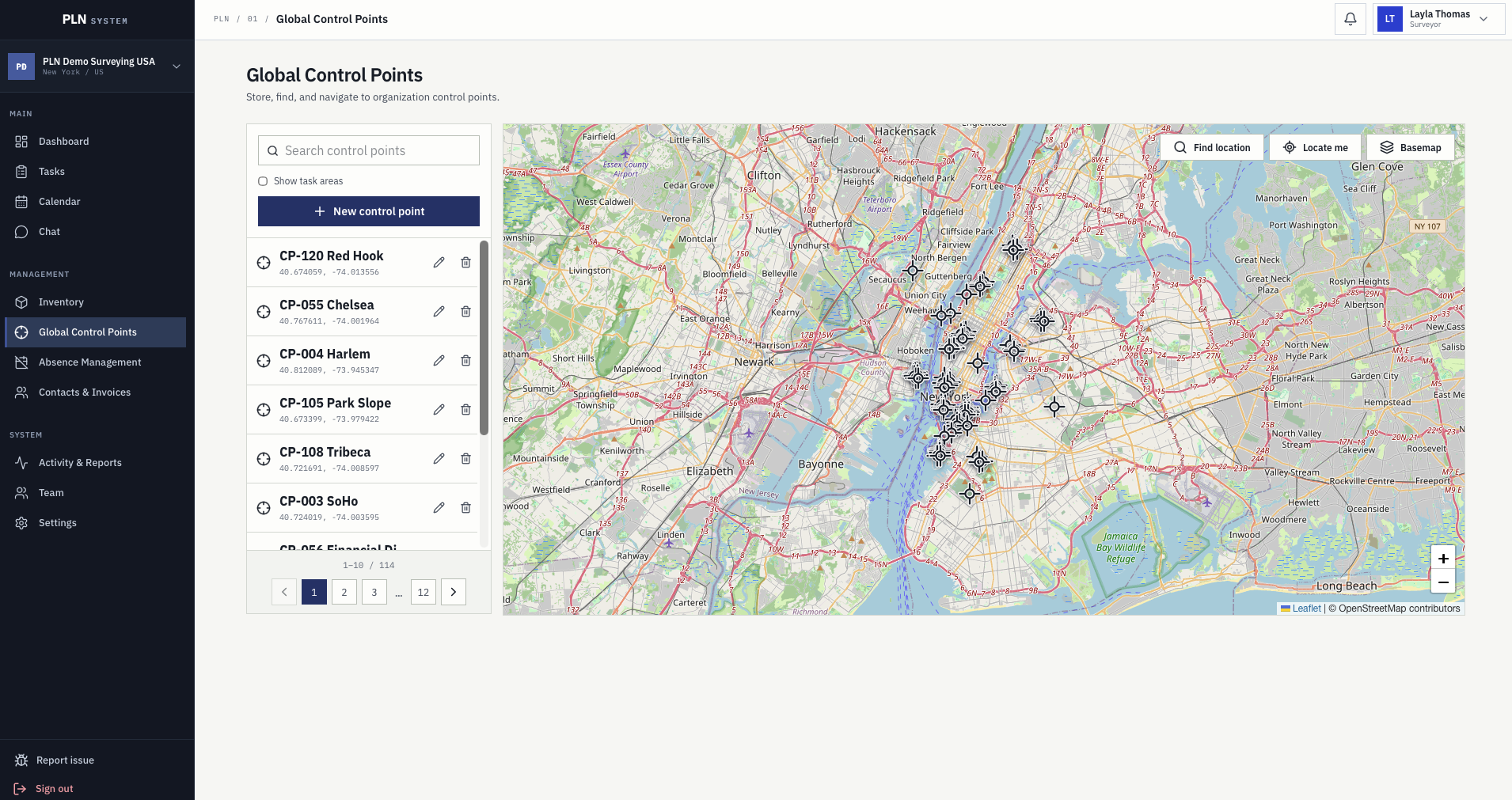
Global control points screen with a searchable point list, coordinates, and a map of all organization control points

Global control points

Benchmarks that belong to the company.

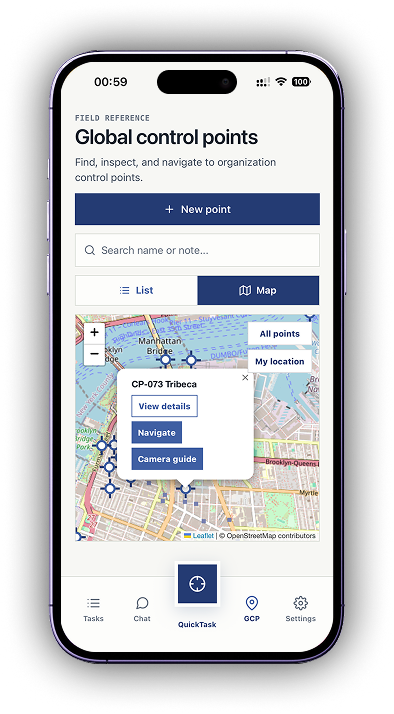
Benchmarks, GNSS reference points, and temporary nails are stored once for the whole organization with their coordinates, a note, and a picture, so a point established two years ago is still usable by whoever is nearest today.

  • Searchable register of every point the company has established
  • Coordinates, notes, and the photo taken when the point was set
  • Task areas shown on the same map as the control point layer
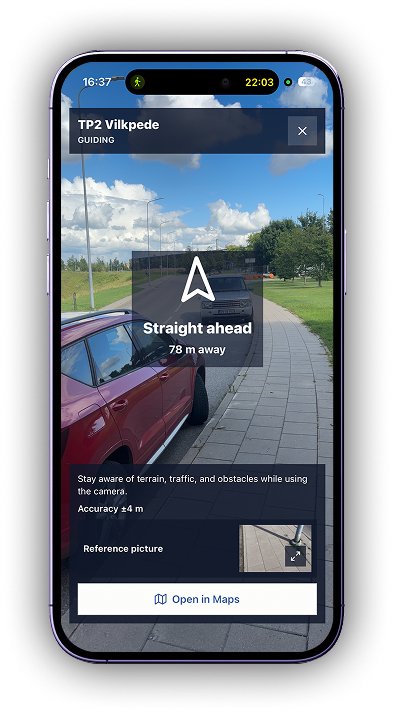
Camera guide on the phone showing a live camera view with a direction arrow, distance to the control point, position accuracy, and the reference picture

Camera guide

The last thirty metres are the hard part.

Coordinates get a crew to the street. The camera guide gets them to the mark: a live camera view with the bearing, the remaining distance, the current position accuracy, and the reference picture of the point side by side.

  • Direction arrow and distance updated as you walk
  • Position accuracy shown, so you know how much to trust it
  • Reference picture of the point available on the same screen
  • Hand off to the phone map when a road route is quicker

PLN System Mobile

A field app for the crew standing on site.

The app is built for the person holding a pole, not for reporting from a desk. It is currently in pre-release testing with beta companies, and what the crew records in it reaches the office immediately.

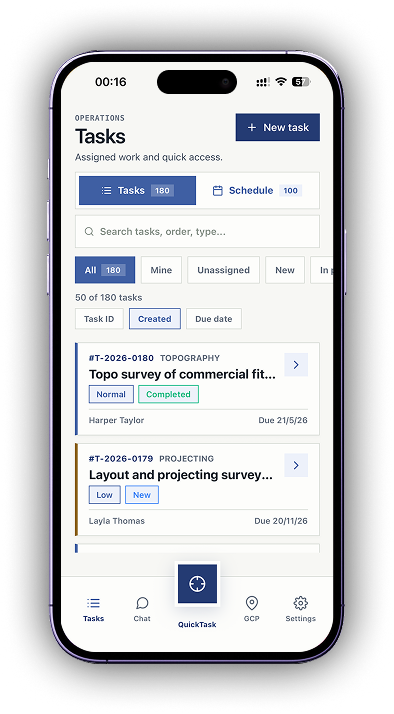
Assigned work with full detail

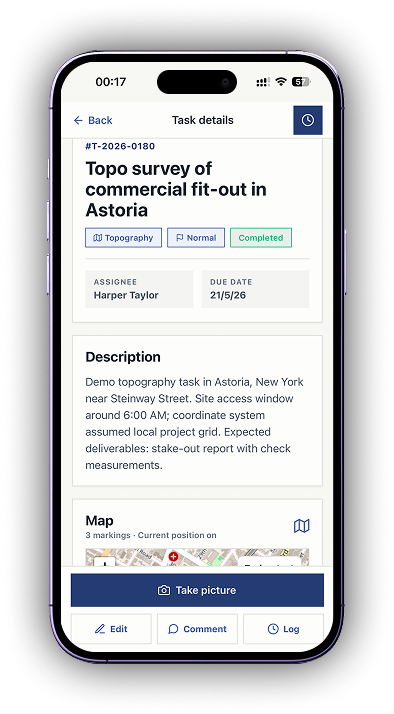
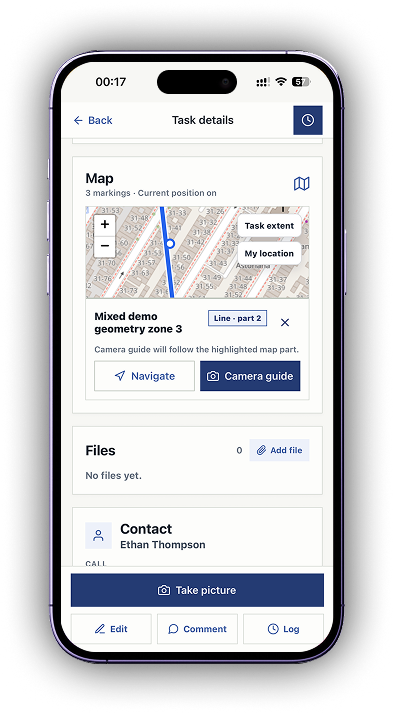
Surveyors open the tasks assigned to them with survey type, priority, status, client, due date, description, and the map markings for the job.

QuickTask

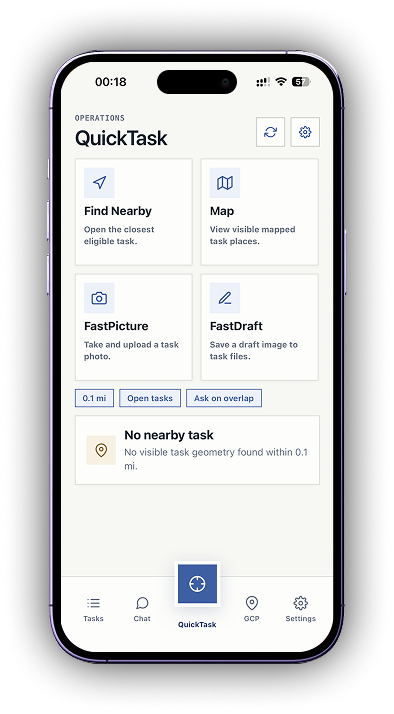
Find the nearest eligible task from where you are standing, or open the map of visible task places. FastPicture uploads a site photo and FastDraft saves a draft image straight to the task files.

Log work where it happens

Take a picture, add a comment, and log time against the task while still on site instead of reconstructing the day in the evening.

Chat with the office

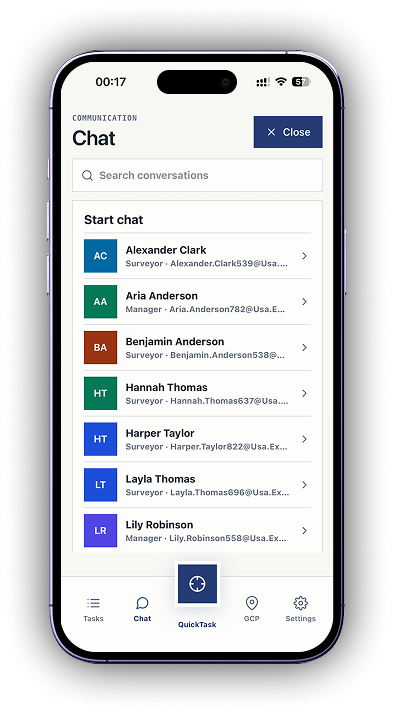
Direct conversations with surveyors and managers happen inside the app, so a field question does not turn into a private message nobody else can find later.

Task geometry and navigation

The task opens on the map with its geometry zone and a navigate action, so a crew reaches the right parcel without a separate list of coordinates.

Control points in the pocket

The organization control point register travels with the crew as a list or a map, with the note and picture recorded when each point was established.

People and scheduling

Vacations and time off are part of planning, not a separate spreadsheet.

Nothing breaks a survey schedule faster than promising a date to a client while the only person who can do the work is already approved for leave. In PLN the people side and the planning side are the same system.

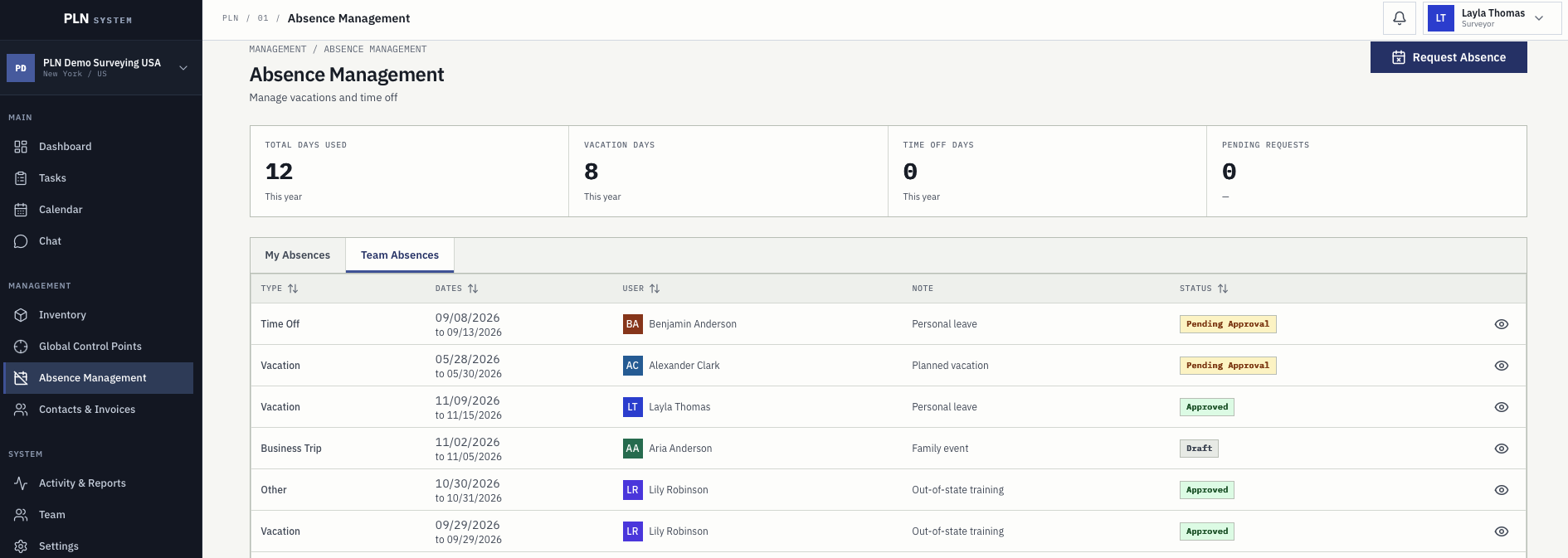
Team absences table with absence type, dates, employee, note, and approval status
Team absences with type, period, note, and approval status in one register.

Team, roles, and permissions

The employee list, job titles, and access rights live in one place, so people see the work and data that belongs to their role.

Requests and approvals

Staff request absences with dates and a note, save them as a draft, or send them for approval. Managers approve or reject from the same table.

Balances everyone can check

Used days, vacation days, time-off days, and pending requests are visible to the employee without asking the office for a number.

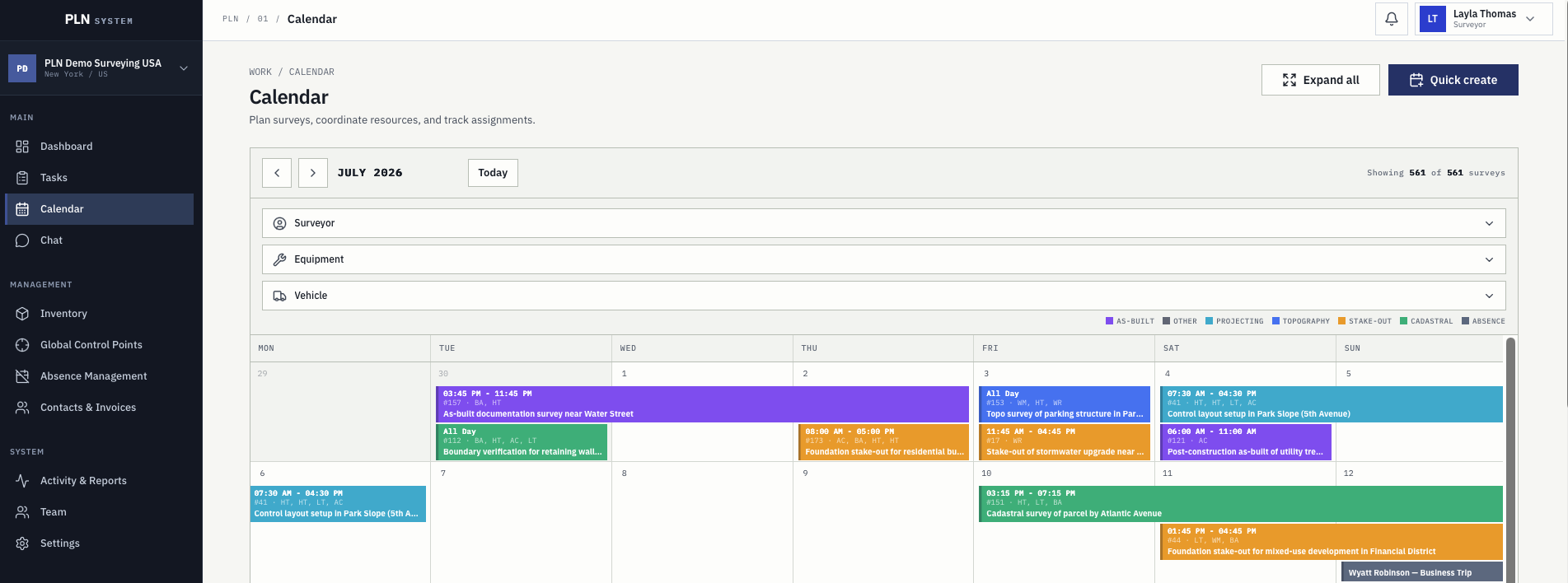
Survey calendar with month view, surveyor, equipment and vehicle filters, colour-coded survey types, and absences

One calendar

Crews, instruments, vehicles, and absences in one grid.

The month view shows planned survey work colour-coded by type, with approved absences in the same grid, so a conflict is visible while the plan is still being made rather than on the morning of the visit.

  • Filters for surveyors, equipment, vehicles, and dates
  • Planned surveys click through to the full task record
  • Single-day and multi-day plans with start and end times

Billing handoff

Billing starts from the work, not from memory.

The gap between finished fieldwork and a sent invoice is where small survey companies lose money. PLN closes it by building the invoice from records the job already produced.

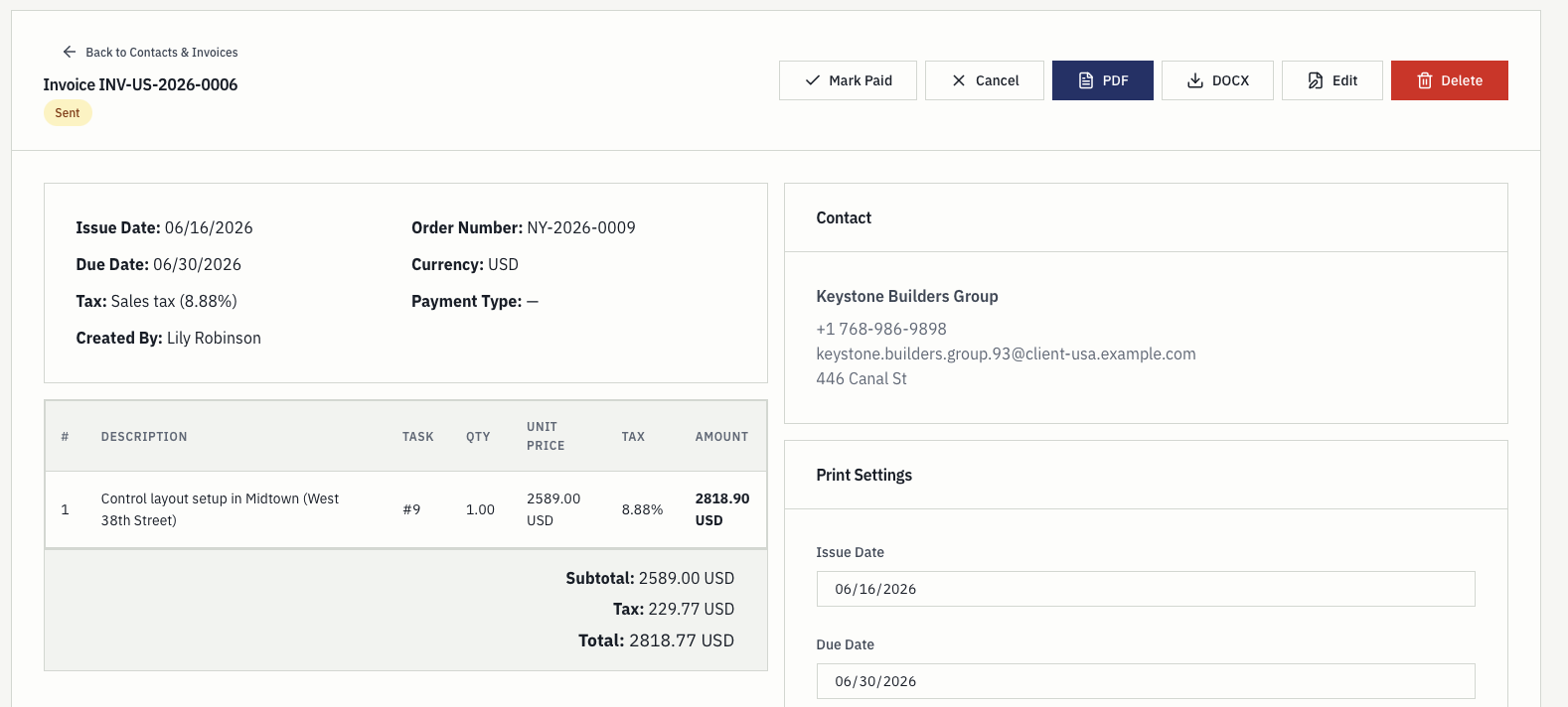
Invoice detail screen with payment actions, contact record, line items, totals, and print settings

Invoice record

Contacts, line items, taxes, and totals already in place.

The invoice is created from task pricing and the contact record, so billing staff review and adjust rather than retype. Payment type, due date, tax, and print settings are on the same screen.

  • Line items, taxes, totals, and payment terms
  • PDF and DOCX export actions
  • Activity and pricing history from the originating task
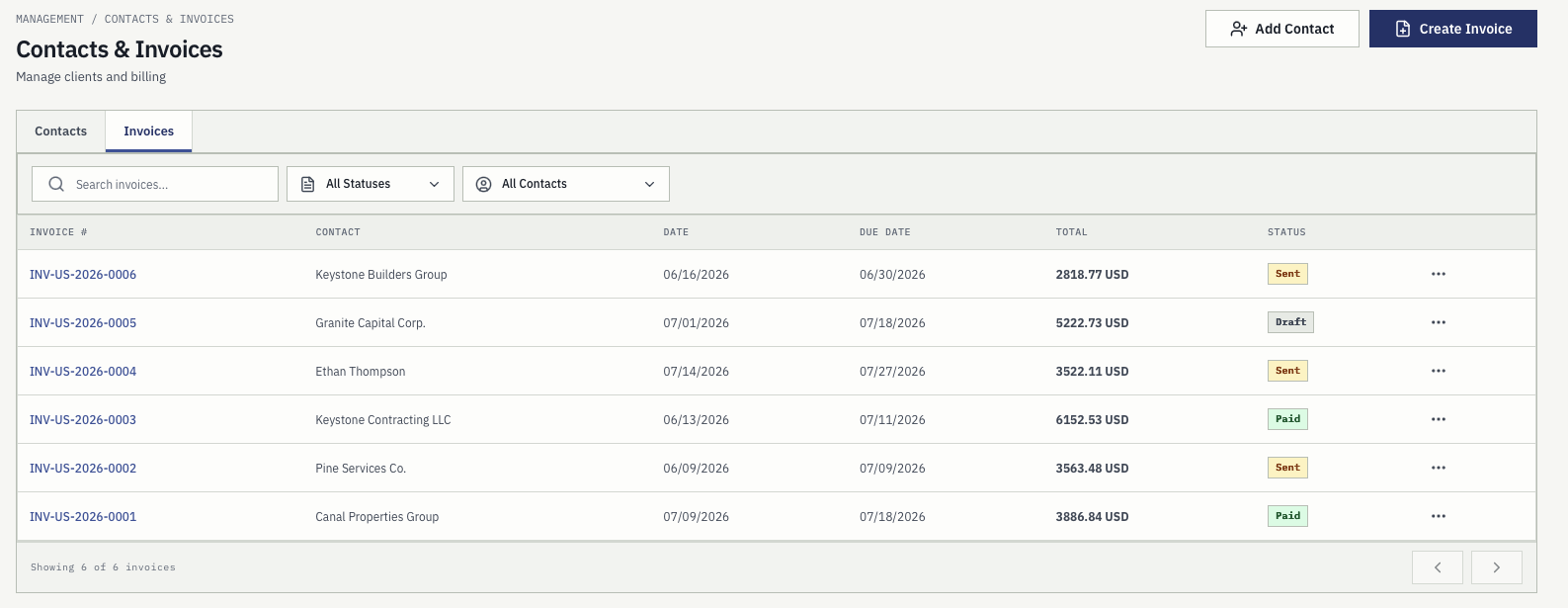
Invoice register with invoice numbers, contacts, issue and due dates, totals, and draft, sent, and paid statuses

Invoice register

What is drafted, sent, paid, and overdue.

The register filters by status and contact and carries issue dates, due dates, and totals, so an owner can answer what is outstanding without opening the accounting package.

  • Draft, sent, paid, and cancelled statuses
  • Filter by contact or status
  • Issue dates, due dates, and totals in one list

Evaluation checklist

What to check before choosing any system.

Most tools demo well. These are the questions that decide whether a land surveying team is still using the software in month three, and how PLN answers each one.

What to check Why it matters for land surveyors How PLN answers it
Job record Generic task fields push the survey details into a description box. Client, location, survey type, priority, price, files, comments, and history are proper fields.
Location An address is not enough when the work is a boundary or a set of marks. Task geometry on the map plus a company control point register with notes and pictures.
Crew planning A promised date means nothing if the surveyor is on leave or the instrument is out. Planning shows surveyors, equipment, vehicles, and approved absences in one calendar.
Equipment Calibration and inspection dates decide whether a job can go ahead at all. Instruments, vehicles, and materials with calibration, check, insurance, and inspection dates.
Field capture Anything reconstructed in the evening is already partly wrong. Time, distance, expenses, photos, and comments logged against the task from the phone.
Billing Retyping job details into an invoice tool is where margin quietly disappears. Invoices built from task pricing, contacts, activity, tax, and payment status, exported to PDF or DOCX.
Permissions Not every user should see every client, price, or invoice. Roles, permission controls, survey privacy, and audit history in admin settings.
Language Field crews adopt software faster when it speaks their language. Localized workspaces in English, Lithuanian, and major European languages.
Leaving Software you cannot walk away from is a liability, not an asset. Your company owns its workspace data; key records export and workspaces can be deleted on request.

Who it serves

Four people in a survey company, four different answers.

Project management software for land surveyors has to be worth opening for the crew as well as the owner, or it becomes another system the office maintains alone.

01

Owners

Active jobs, workload, logged hours, pending invoices, and the coordination gaps that are costing delivery time.

02

Project managers

Crew plans, instrument and vehicle availability, absence conflicts, due dates, and where each job currently stands.

03

Field surveyors

Today's assigned work, task geometry, control points, notes, files, and a way to record time and photos on site.

04

Admin and billing

Contacts, task pricing, invoice statuses, exports, payment terms, taxes, and company settings in one workspace.

Pricing

Priced for small and medium survey companies.

Founding beta access is free until 31 December 2026, with no credit card and no automatic conversion. After beta, the plan sets how many users and how much storage the workspace has, not which parts of the product you may open.

Starter

EUR 9 / month

USD $10 / month

Users included 2 users
Storage included 5 GB
Enterprise

EUR 59 / month

USD $65 / month

Users included 10 users
Storage included 75 GB

USD equivalents are approximate. EUR remains the primary listed billing currency. Extra users and storage can be added as the team grows.

Questions

Common buying questions.

Who is project management software for land surveyors for?

It is for survey company owners, project managers, field surveyors, and billing staff who need one current view of each job instead of a spreadsheet, a shared calendar, a chat thread, and a separate invoice file.

Does PLN replace our spreadsheets, shared calendar, and field notes?

That is the usual reason companies move. The task record replaces the job spreadsheet, survey planning replaces the shared calendar, and activity logged on site replaces notes that were retyped later.

Can surveyors use it in the field?

Yes. The mobile app, currently in pre-release testing with beta companies, gives crews their assigned tasks with map geometry, control points, files, and contacts, and lets them log time, photos, and comments from site.

Does it store control points and task geometry, or only text?

Control points are stored for the whole organization with coordinates, a note, and a picture, and task areas appear on the same map. A camera guide shows bearing, remaining distance, and position accuracy for the final approach to a mark.

How does it handle equipment calibration and vehicles?

Instruments, vehicles, and materials are kept with serial numbers, calibration, check-and-adjust, insurance, and inspection dates, and that status is visible during planning rather than discovered on site.

Can we invoice from the same system?

Yes. Invoices are created from task pricing and contact records with line items, taxes, payment terms, and due dates, move through draft, sent, paid, and cancelled statuses, and export to PDF or DOCX.

Does it cover vacations, time off, and approvals?

Yes. Staff request absences with dates and a note, managers approve or reject them from the same register, balances are visible to the employee, and approved absences appear in the planning calendar.

What languages does PLN support?

PLN supports localized workspaces across English, Lithuanian, and major European languages, including German, French, Spanish, Italian, Polish, Dutch, Czech, Danish, Estonian, Finnish, Greek, Hungarian, Latvian, Norwegian, Portuguese, Swedish, and Turkish.

What does it cost, and can we try it on real jobs first?

Founding beta access is free until 31 December 2026 with no credit card required. After beta, plans start at EUR 9 per month for 2 users and 5 GB, with every feature included in each plan.

Who owns the data, and can we get it out?

Your company owns its project, client, team, activity, and billing records. Key records can be exported and beta users can request workspace deletion through support. PLN is built in Lithuania, in the EU.

Next step

See how PLN fits your survey workflow.

Apply for the founding beta or contact the team with questions about rollout, pricing, trust, and workflow fit.