Surveying operations software

Surveying Project Management Software

PLN helps survey companies manage the operational chain that generic project tools miss: job intake, planned fieldwork, surveyors, instruments, vehicles, activity logs, reports, and invoice-ready records.

PLN System operational overview dashboard for survey task, planning, activity, and invoice management
One job record from the first client call to the paid invoice. Tasks, survey plans, crews, instruments, vehicles, absences, field activity, reports, contacts, and billing stay in one workspace instead of five disconnected tools.

Built for the survey job record

Each task keeps the client, location, survey type, due date, price, assignee, attachments, comments, planning history, and invoice actions together.

  • Survey-specific task intake
  • Map and location context
  • Status, priority, price, and history

Plan fieldwork before crews leave

Managers can plan single-day or multi-day surveys, assign surveyors and resources, and see scheduling context before field work starts.

  • Crew and resource planning
  • Equipment and vehicle visibility
  • Absence-aware scheduling context

Turn activity into reports and invoices

Logged hours, distance, expenses, comments, task status, and invoice history stay connected so admin work does not restart from scratch.

  • Activity and monthly reporting
  • PDF and DOCX invoice export
  • Operational history by task

On this page

A full walkthrough, not a brochure.

Everything a survey company normally asks before booking a demo is answered below: the workflow, the actual screens, the modules, how field crews use it, who it serves, how it differs from generic project tools, and what it costs.

Operational workflow

One record follows the job from request to payment.

Surveying project management software has to hold more than a checklist. In PLN every step writes back to the same job record, so the next person to open it does not start from an empty screen or a forwarded email.

01

Create the task

Capture the client, address or coordinates, survey type, assignee, priority, price, due date, attachments, and comments in one structured job file.

02

Plan the survey

Build single-day or multi-day field plans with start and end times, private notes, and tentative schedules before a date is promised to the client.

03

Dispatch people and resources

Assign surveyors, instruments, vehicles, and materials with existing bookings and approved absences visible in the same calendar.

04

Record what actually happened

Work time, distance, expenses, photos, comments, and status changes are logged against the task while the crew is still on site.

05

Invoice from the same record

Create the invoice from captured pricing and activity, export PDF or DOCX, and keep payment status attached to the job it came from.

Product tour

The screens your team would actually work in.

These are the real screens, not illustrations. Switch between them to see how the same job appears to the office in the morning, to the manager planning the week, and to whoever prepares the invoice.

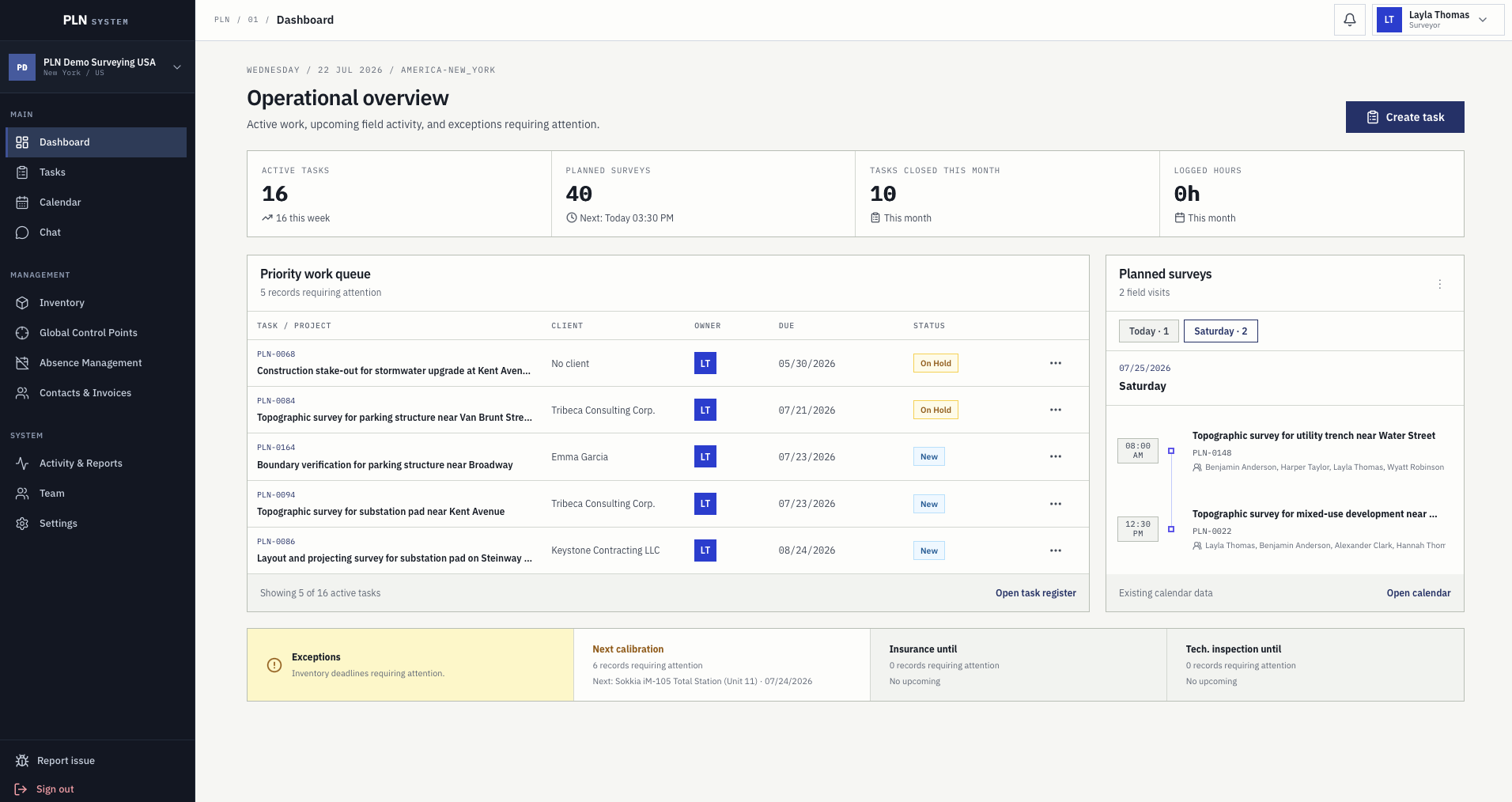
Operational overview dashboard with active task counts, priority work queue, planned surveys, and inventory exceptions

Operational overview

The morning picture of the company in one screen.

Active tasks, planned surveys, closed work, and logged hours sit next to the priority queue and the exceptions that need a decision today.

  • Priority work queue with client, owner, due date, and status
  • Planned field visits for today and the coming days
  • Exception cards for calibration, insurance, and inspection deadlines
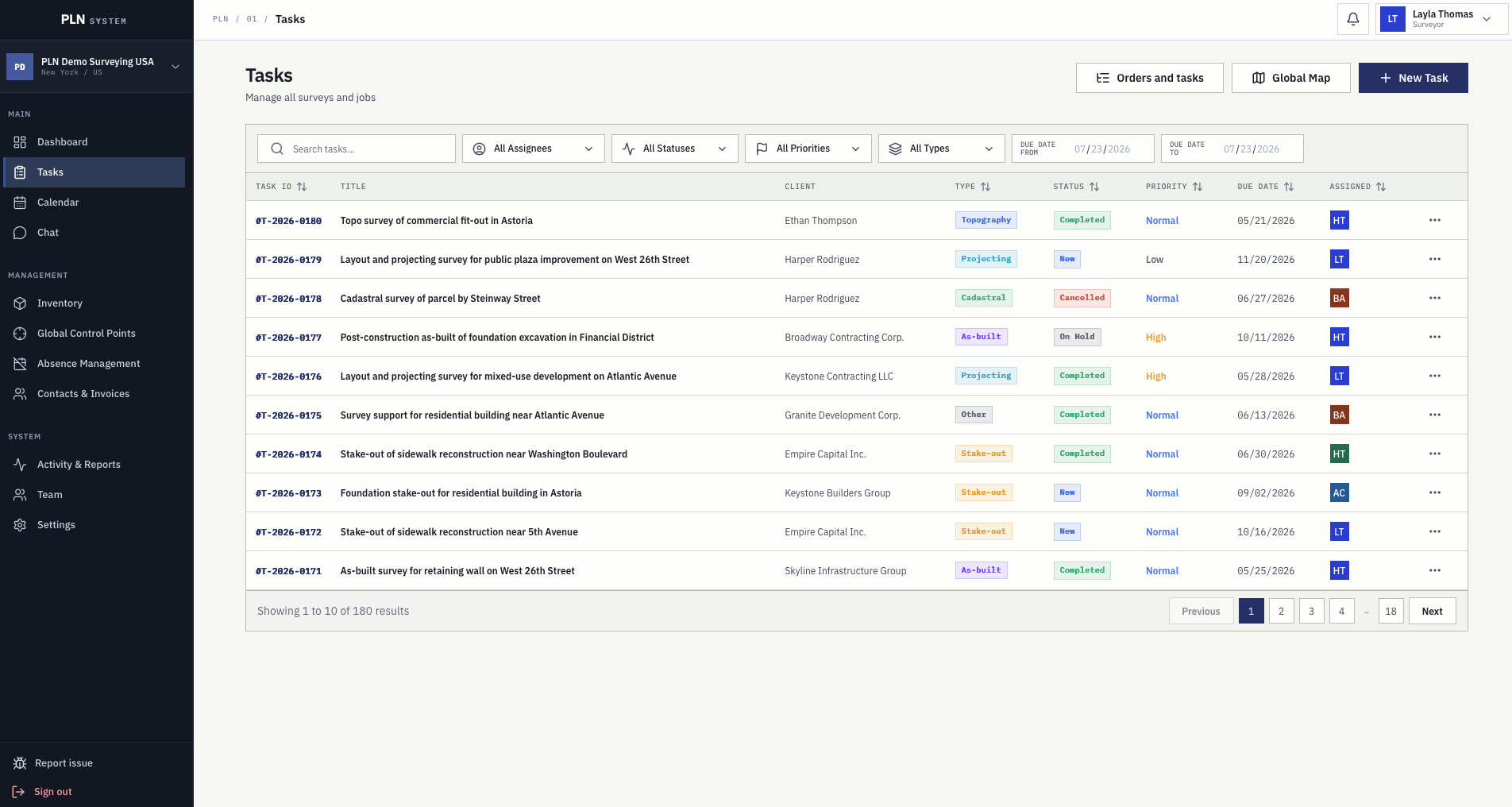
Task register with search, assignee, status, priority, type, and due date filters across survey jobs

Task record

Every survey starts from a structured job file.

Managers see scope, client, team, due dates, pricing, attachments, comments, planning, and activity without chasing updates across tools.

  • Task number, type, status, assignee, priority, and price
  • Filters for assignee, status, priority, survey type, and due date range
  • Full history on the record instead of in one person's inbox
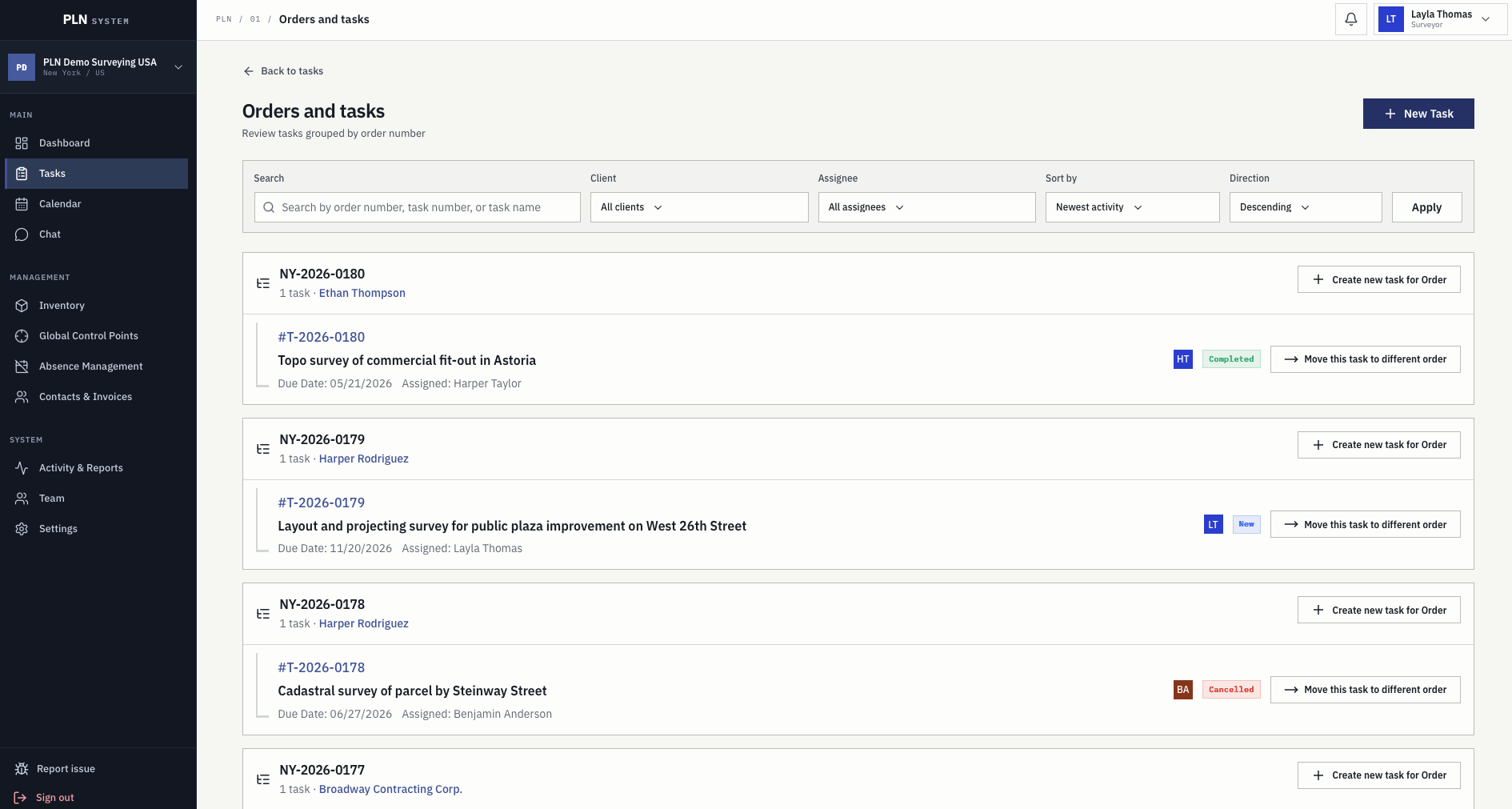
Orders and tasks screen grouping survey tasks under their order number with client and assignee

Orders and lineage

Client orders keep their related tasks together.

One order often becomes several survey tasks. The grouped view shows what was ordered, what is already running, and what still has to be created.

  • Tasks grouped under their originating order number
  • Create a new task directly for an existing order
  • Move a task to a different order when the scope changes
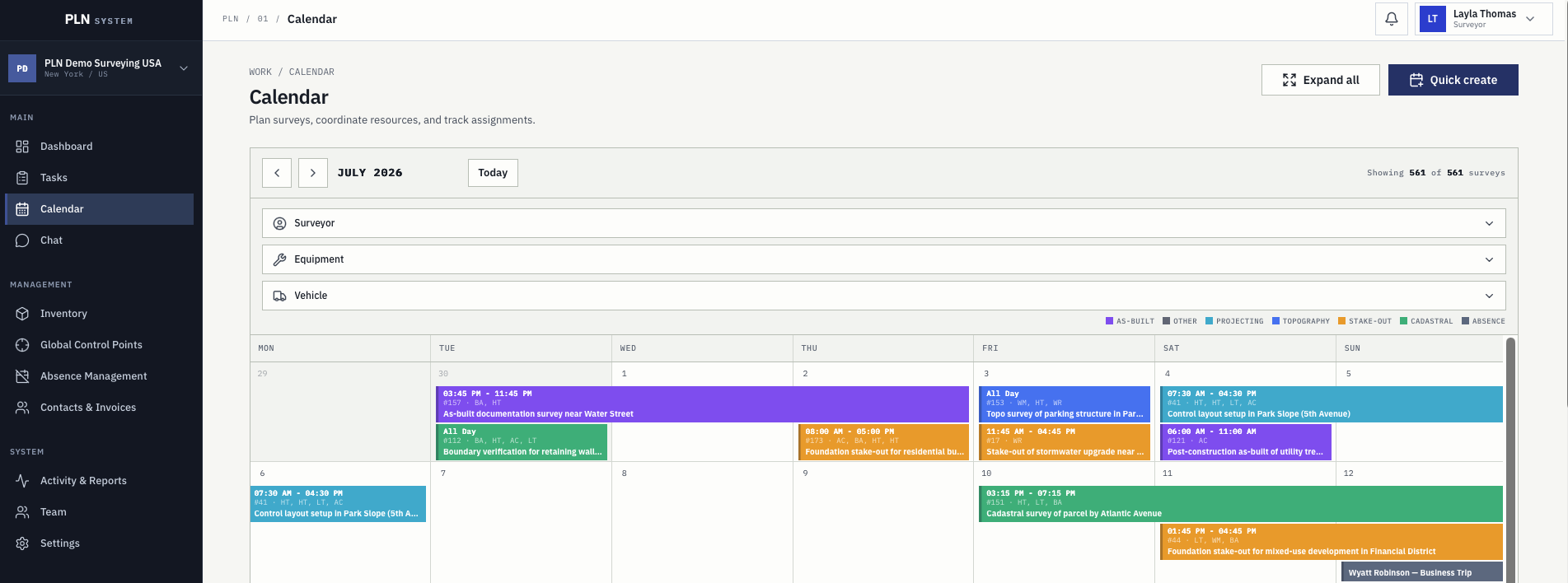
Survey calendar with month view, surveyor, equipment and vehicle filters, colour-coded survey types, and absences

Schedule visibility

The whole team sees what is planned and what is unavailable.

Calendar filters help managers coordinate crews, instruments, vehicles, planned surveys, and approved absences from a single view.

  • Month view of planned survey work
  • Filters for surveyors, equipment, vehicles, and dates
  • Colour-coded survey types with absences shown in the same grid
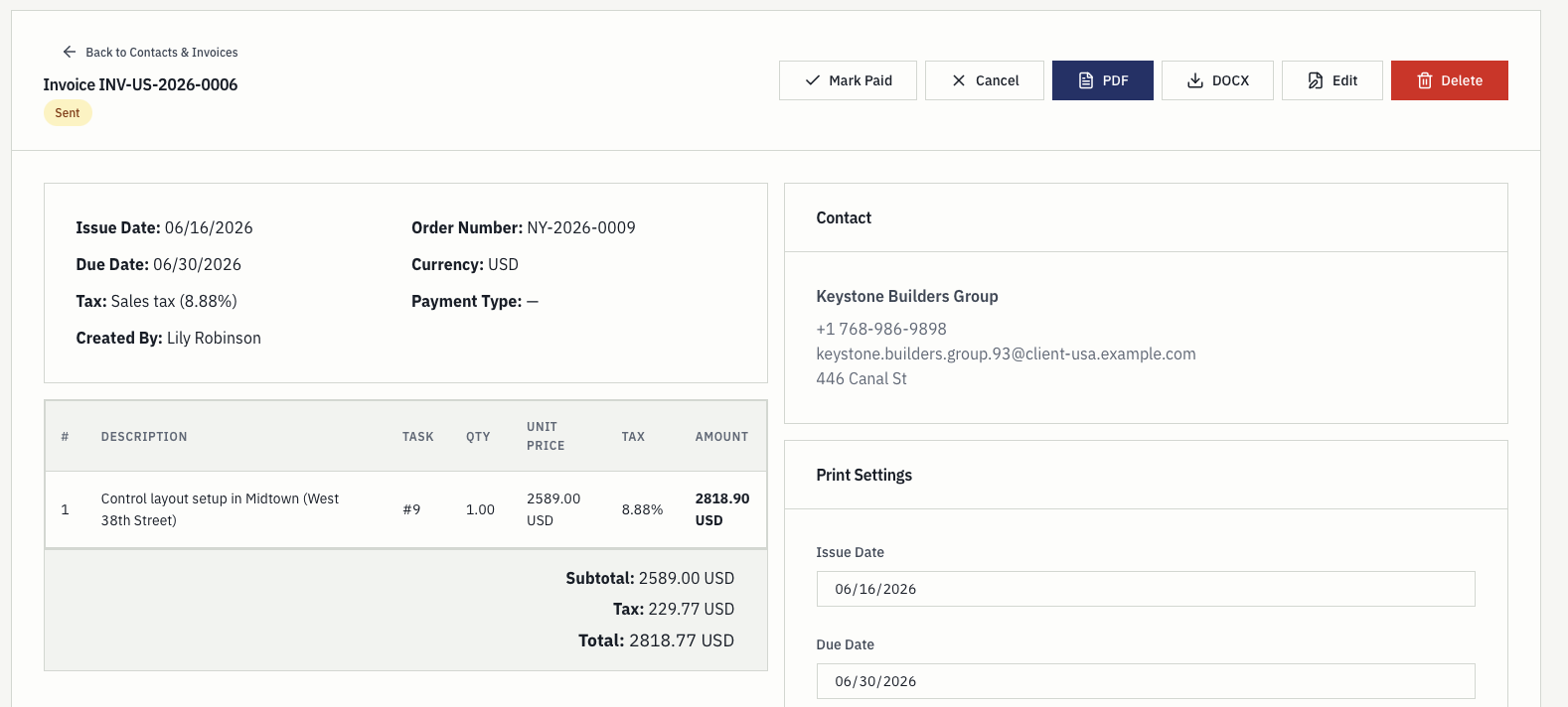
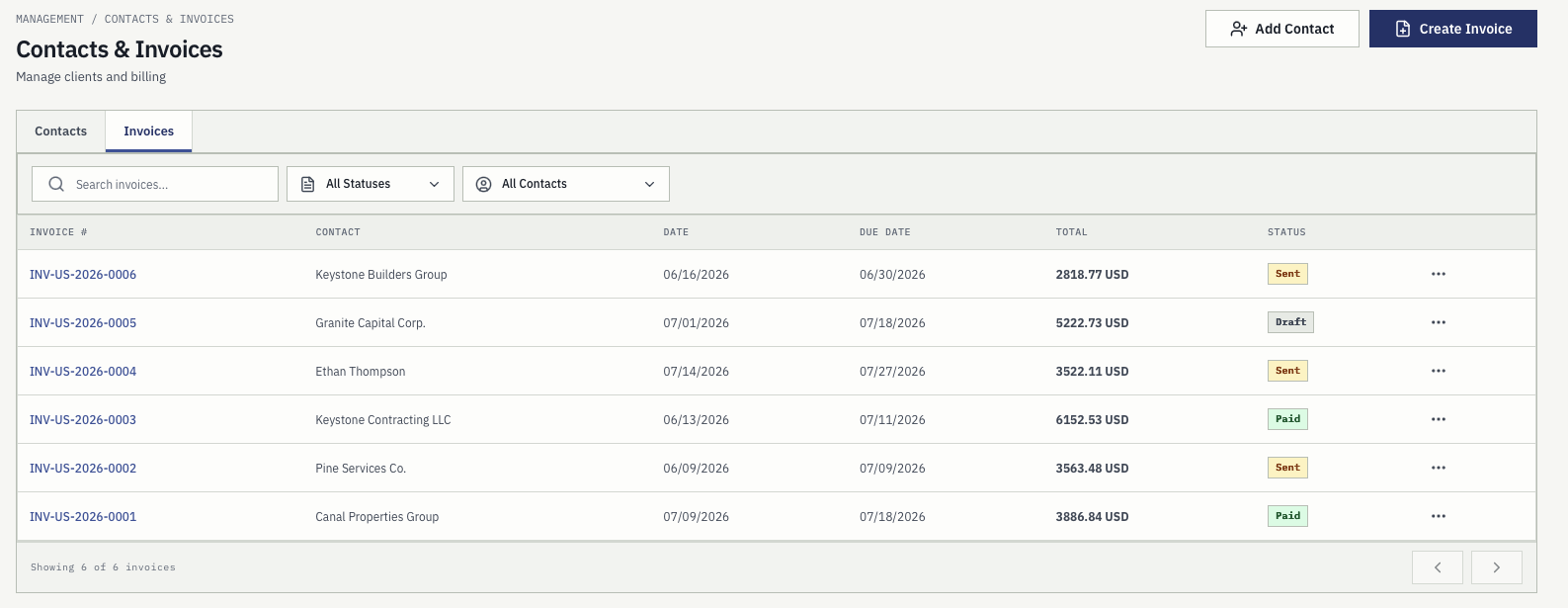
Invoice detail screen with payment actions, contact record, line items, totals, and print settings

Billing

Invoices are created from work already captured in PLN.

Billing staff review contacts, task line items, tax, payment type, dates, and exports without manually rebuilding the job from notes.

  • Draft, sent, paid, and cancelled statuses
  • PDF and DOCX export actions
  • Tax, payment terms, due dates, and activity history

Inside the workspace

Survey-specific modules instead of disconnected apps.

PLN is deliberately narrower than generic project management software. It covers the areas where survey data has to agree: what the instruments are doing, what the crews recorded, who the client is, and what has been billed.

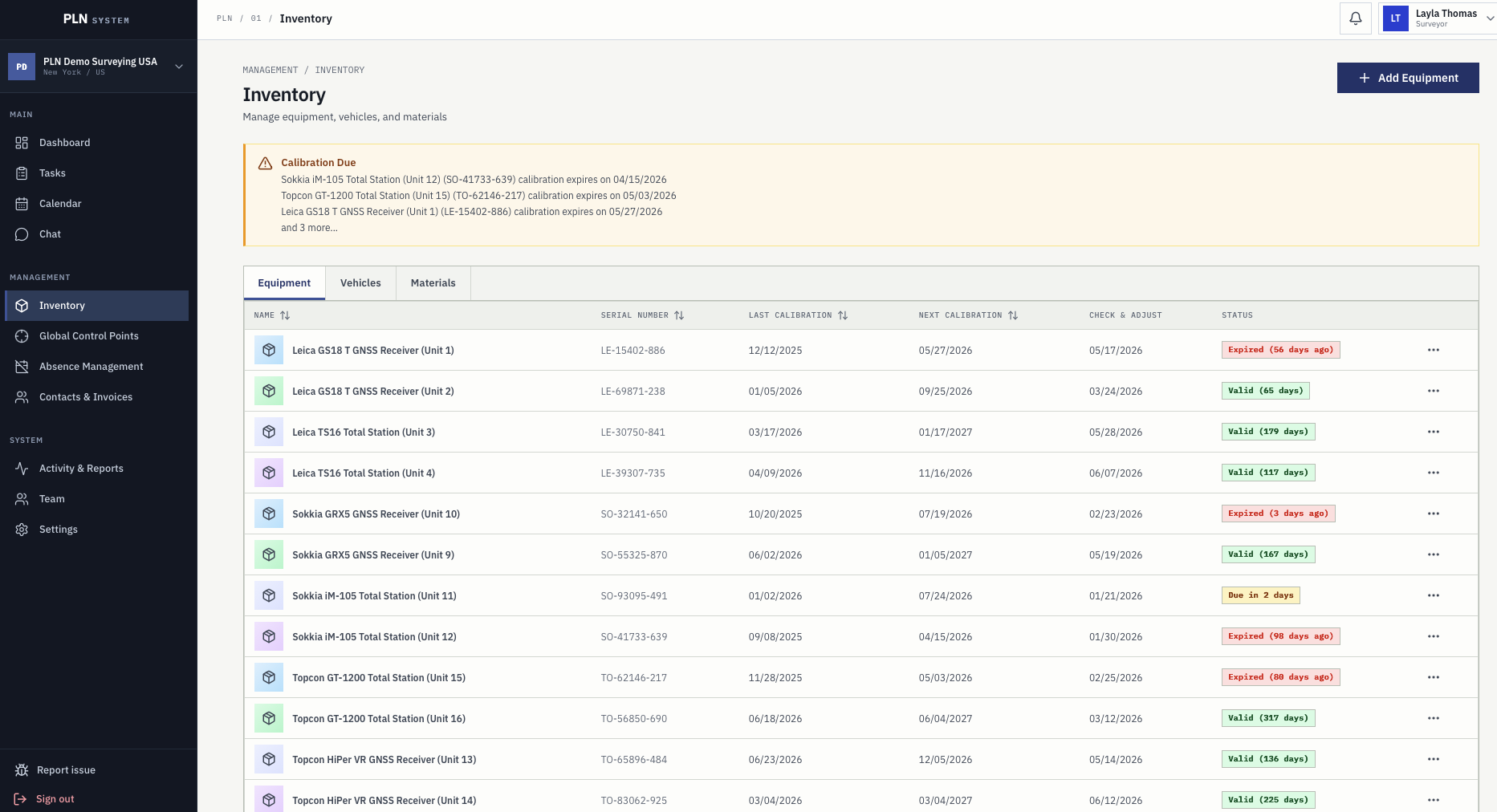
Equipment inventory with calibration due warnings, serial numbers, next calibration dates, and validity status

Inventory that affects the schedule.

Equipment, vehicles, and materials are not just lists. Calibration, check-and-adjust, insurance, and inspection dates are visible during planning, so availability is known before the crew leaves.

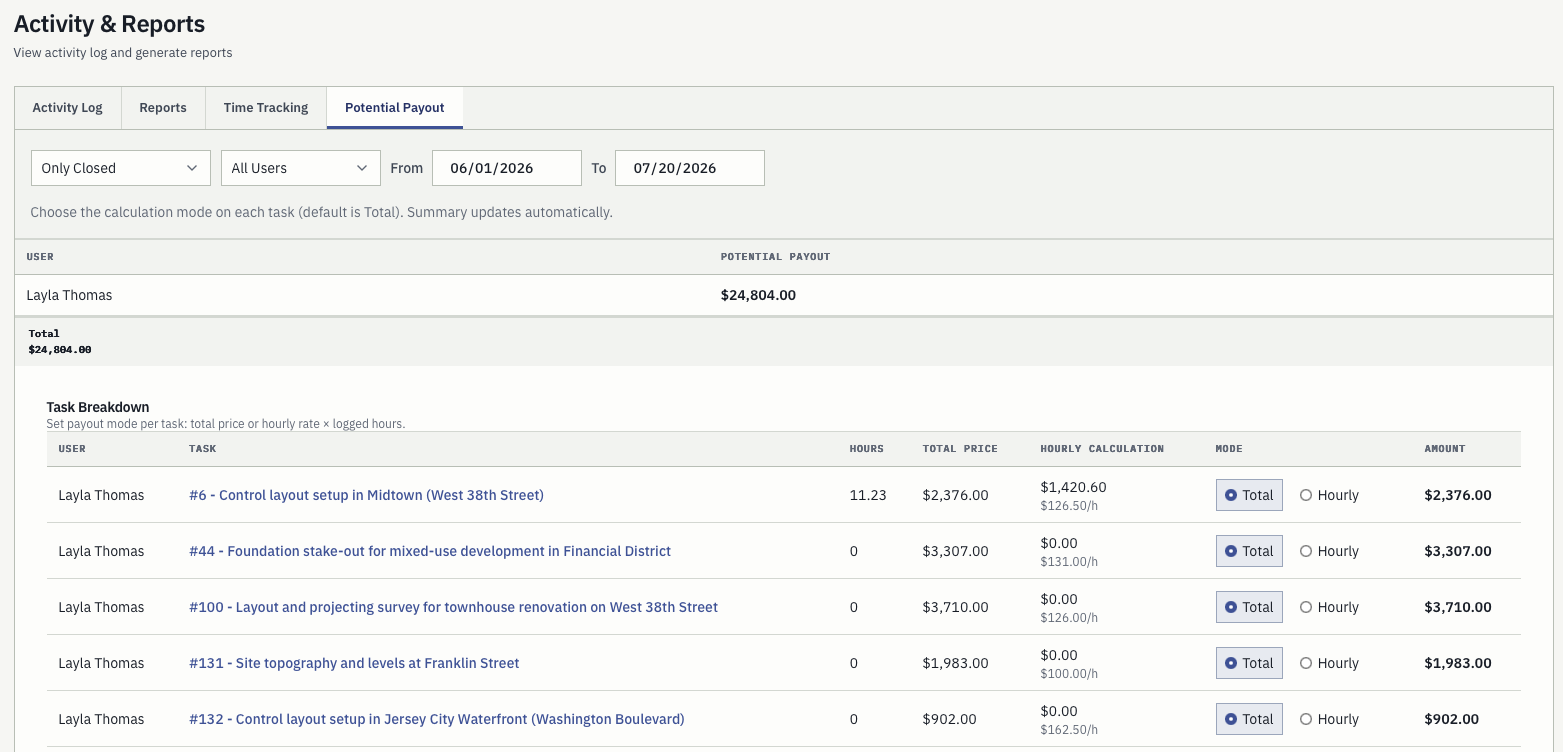
Activity and reports screen with the potential payout tab, per-task hours, total price, hourly rate, and calculation mode

Reports grounded in daily activity.

Activity log, monthly reports, time tracking, and potential payout are calculated from work already recorded. Choose a total price or an hourly rate per task and the summary updates itself.

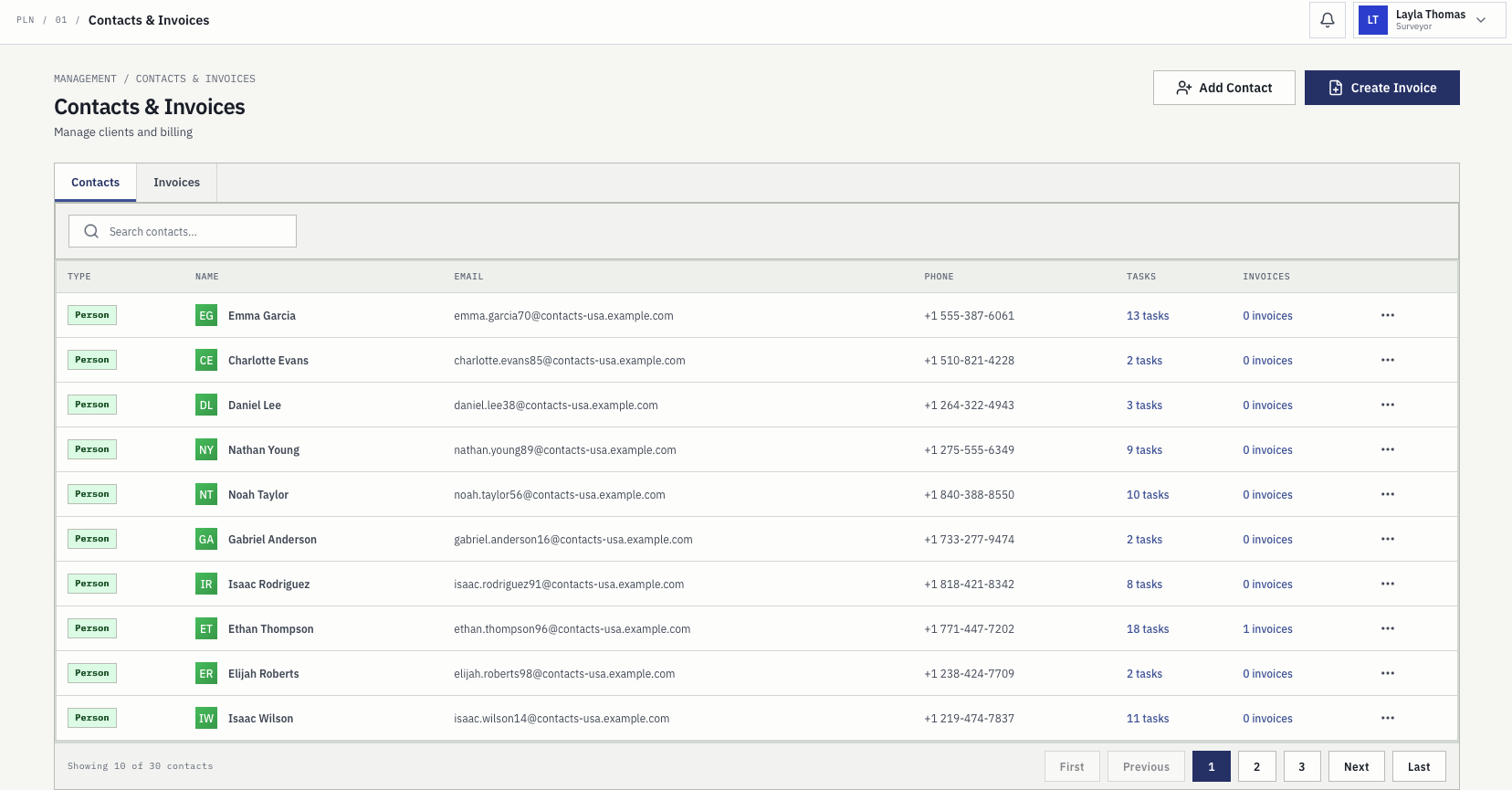
Contacts register with person and company records, emails, phone numbers, and linked task and invoice counts

Clients connected to their work.

People and companies are stored with their contact details, and each record shows how many tasks and invoices belong to it, so history is one click away instead of one search through email.

Invoice register with invoice numbers, contacts, issue and due dates, totals, and draft, sent, and paid statuses

Billing that follows the job.

Invoices are filtered by status and contact, carry issue and due dates and totals, and export to PDF or DOCX from the record the survey work already created.

Office and field

Project management that reaches the crew on site.

Survey work is decided outdoors. PLN stores the location context the field needs, and the app carries assigned work, task geometry, control points, photos, and chat into the field while the office sees the result immediately.

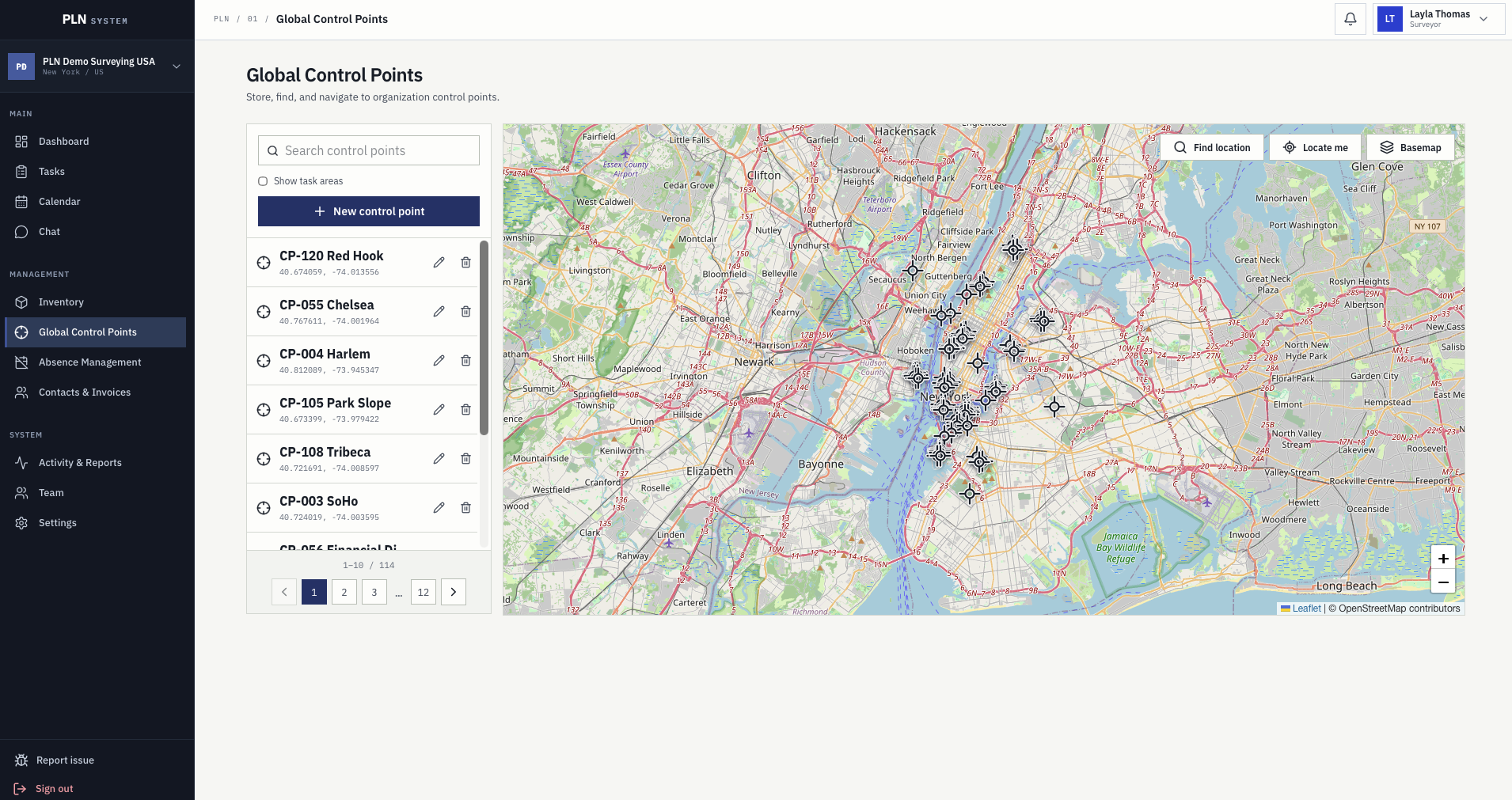
Global control points screen with a searchable point list, coordinates, and a map of all organization control points
Every control point the company has established, searchable and shared across the organization.

Control points stored once

Benchmarks, GNSS reference points, and temporary nails keep their coordinates, note, and picture so a point set two years ago is still usable by whoever is nearest today.

Task geometry on the map

Task areas are shown on the same map as the control point layer, so crews can see which points actually serve the job they are heading to.

Navigation and camera guide

A point opens with its note, its photo, and a navigation action, and the camera guide shows bearing, remaining distance, and position accuracy for the last stretch on foot.

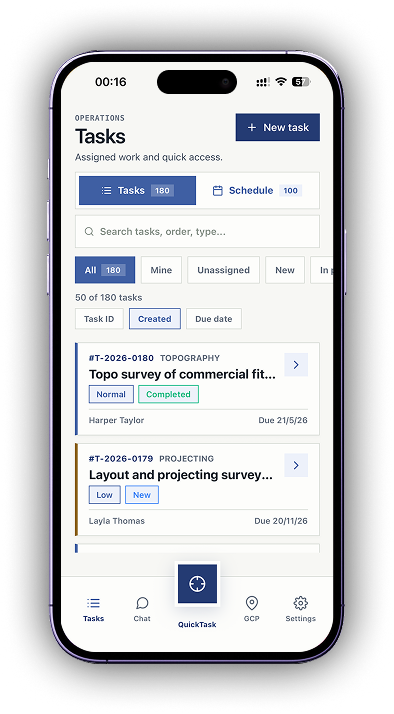
PLN mobile task list with tabs for tasks and schedule, filters, survey type, priority, status, and due dates

PLN System Mobile

Assigned work in the pocket, in pre-release testing.

The mobile app is currently in pre-release testing with beta companies. Crews open the tasks assigned to them with the full detail the office entered, and record what happened without waiting for the evening.

  • Assigned tasks with survey type, priority, status, client, and due date
  • QuickTask to find the nearest eligible job from where you are standing
  • Photos, comments, and logged time saved against the task on site
  • Direct chat with surveyors and managers instead of private messages

Built around responsibility

Different users need different operational answers.

Project management software only survives if everyone in the company gets something from it on the first day, not just the person who bought it.

01

Survey company owners

See workload, active jobs, pending invoices, logged time, and where manual coordination is quietly slowing delivery down.

02

Project managers

Plan crews, confirm equipment, avoid absence conflicts, monitor due dates, and keep clients moving without a wall of spreadsheets.

03

Field surveyors

Know the assigned work, location context, planned time, equipment, vehicles, comments, and what still needs to be done on site.

04

Admin and billing

Manage contacts, task pricing, invoice statuses, PDF and DOCX exports, payment terms, taxes, and company settings.

Comparison

Where generic project management software runs out.

General project tools handle tasks and deadlines well. They struggle at the points where surveying is a physical operation with instruments, coordinates, crews, and regulated equipment dates.

Operational need Generic project software PLN System
Job record Generic tasks with custom fields bolted on later. Client, location, survey type, price, files, and history are built-in fields on the task.
Scheduling A calendar that does not know who is on holiday or which instrument is booked. Planning shows surveyors, equipment, vehicles, and approved absences in one grid.
Equipment Tracked in a separate spreadsheet, if at all. Instruments, vehicles, and materials with calibration, insurance, and inspection dates.
Field activity Reported in chat and retyped into a report later. Hours, distance, expenses, photos, and comments logged against the task from the field.
Location context An address typed into a text field. Task geometry on the map plus a company-wide control point register with notes and photos.
Billing Exported to another tool that rebuilds the job from scratch. Invoices created from task pricing, contacts, activity, tax, and payment status.
Rollout A configuration project before the first job can be created. The survey workflow is ready on day one, with founder-led setup help during beta.

Pricing

Transparent monthly plans, full feature set in every one.

Founding beta access is free until 31 December 2026. After beta, the plan decides how many users and how much storage the workspace has, not which modules you are allowed to open.

Starter

EUR 9 / month

USD $10 / month

Users included 2 users
Storage included 5 GB
Enterprise

EUR 59 / month

USD $65 / month

Users included 10 users
Storage included 75 GB

USD equivalents are approximate. EUR remains the primary listed billing currency. Extra users and storage can be added as the team grows.

Questions

Common buying questions.

Who is surveying project management software for?

It is for survey company owners, project managers, field surveyors, and billing teams that need task, planning, resource, activity, and invoice context in one workflow.

How is PLN different from generic project management software?

PLN focuses on survey operations: task records with location and survey type, field planning, equipment and vehicle context, absences, activity logging, reports, contacts, and invoice export. Generic tools handle the task list but not the instruments, coordinates, and billing handoff around it.

Does it cover fieldwork as well as office planning?

Yes. Task geometry and a company-wide control point register give crews the location context, and the mobile app, currently in pre-release testing with beta companies, carries assigned work, photos, comments, time logging, and chat into the field.

Can PLN replace our spreadsheets and shared calendar?

That is the usual reason companies move. Task lists, crew plans, equipment notes, activity logs, and invoice details become one connected record instead of separate files that stop agreeing with each other.

Does it track equipment and vehicles as well as projects?

Yes. Instruments, vehicles, and materials are stored with serial numbers, calibration, check-and-adjust, insurance, and inspection dates, and that status is visible while work is being planned.

Can we create invoices in the same system?

Yes. Invoice records are built from task pricing, contact details, line items, taxes, and payment terms, move through draft, sent, paid, and cancelled statuses, and export to PDF or DOCX.

How long does it take to start using PLN?

The survey workflow is configured out of the box, so a company can create real tasks on the first day. During the founding beta we also help map your current job list, statuses, team roles, and workflow into a clean setup.

What does PLN System cost?

Plans start at EUR 9 per month for 2 users and 5 GB, with Professional at EUR 29 and Enterprise at EUR 59 per month. Every plan includes the full feature set, and extra users or storage can be added separately.

Who owns the data, and can we export it?

Your company owns its project, client, team, activity, and billing records. Key records can be exported, and beta users can request workspace deletion through support. PLN is built in Lithuania, in the EU.

Next step

See how PLN fits your survey workflow.

Apply for the founding beta or contact the team with questions about rollout, pricing, trust, and workflow fit.